My Hobby Essay In Urdu

My Hobby Essay In Urdu 

Farigh auqat ko kaam mein lanay ke liye insan ko koi na koi mashghala zaroor ikhtyar karna chahiye maslan baghbani, parhna likhna, ticket jama karna. sikay jama karna, tasweer banana, tasweerain jama karna wagera. Mera mashghala ticket jama karna hai. Main tarah tarah ke ticket jama karta raha hon aur free time yani farigh waqt mein mere album mein tarteeb se lagata rehta hon. Is tarah ke lamhat bohat achi tarah guzar jatay hain.

knowledge streams blog spot dot com free knowledge blog. download free source codes for python and java and other free stuff.


Ticket jama karna yani collecting ticket mera pasandida mashghala hai. Is liye main ne kabhi koshish nahin ki ke jald az jald bohat sare ticket khareed loun aur album bhar loun. Khareed kar aik hi baar bohat se ticket hasil kar laina mashghalay ke adab ke khilaf hai. Is ka taqaza hai ke aik ticket ke husool ke liye mehnat ki jaye. Chunachay mein ticket khaton se utarta hon ya dusron se tickets ka tabadla karta hon. Is se jama karne mein waqt tou lagta hai magar maza bhi ata hai.

knowledge streams blog spot dot com free knowledge blog. download free source codes for python and java and other free stuff.


Mere pas bari khubsurat album hai. Is par har mulk ke ticket lagane ke liye alag alag safhay hain. Main un safhon par mukhtalif mulkon ke naye naye ticket lagata rehta hon. Ab mere paas itnay zayada ticket ho chukay hain ke mujhe kam az kam 2 album aur khareednay ki zaroorat hai.

knowledge streams blog spot dot com free knowledge blog. download free source codes for python and java and other free stuff.

Ticket jama karne ka mashghala bohat mufeed bhi hai. Is se sirf farigh auqat hi achay nahin guzartay balkeh is ke khuch amli faide bhi hain. Tickets ke mushahiday se mukhtalif mumalik ki shakhsiyat, muqamat wagera ke bare mein maloomat hasil hoti hain aur wahan ke awam aur hukmaranon ke bare mein bhi bohat khuch maloom hota hai kyoun ke tickets wali tasaweer is silsile mein rehnumai karti hain. Un ke nazdeek mukhtalif mulkon ke qaumi dinon, awami taqreebat aur yadgar ke baray mein maloomat hasil hoti hain. Main tou dusron ko bhi mashwara doun ga ke wo farigh waqt ke liye koi na koi mashghala zaroor ikhtyar karain.

knowledge streams blog spot dot com free knowledge blog. download free source codes for python and java and other free stuff.


#urdu #hobby #essay #mazmon #ticket #mufeed  #urdu

knowledge streams blog spot dot com free knowledge blog. download free source codes for python and java and other free stuff.


The Jupyter Notebook

The Jupyter Notebook is an open-source web application that allows you to create and share documents that contain live code, equations, visualizations and narrative text. Uses include: data cleaning and transformation, numerical simulation, statistical modeling, data visualization, machine learning, and much more.

knowledge streams blog spot dot com free knowledge blog. download free source codes for python and java and other free stuff.




Language of choice

Jupyter supports over 40 programming languages, including Python, R, Julia, and Scala.

Share notebooks

Notebooks can be shared with others using email, Dropbox, GitHub and the Jupyter Notebook Viewer.

Interactive output

Your code can produce rich, interactive output: HTML, images, videos, LaTeX, and custom MIME types.

Big data integration

Leverage big data tools, such as Apache Spark, from Python, R and Scala. Explore that same data with pandas, scikit-learn, ggplot2, TensorFlow.


Centralized deployment

Deploy the Jupyter Notebook to thousands of users in your organization on centralized infrastructure on- or off-site.

Container friendly

Use Docker and Kubernetes to scale your deployment, isolate user processes, and simplify software installation.
knowledge streams blog spot dot com free knowledge blog. download free source codes for python and java and other free stuff.

Code meets data

Deploy the Notebook next to your data to provide unified software management and data access within your organization.

Pluggable authentication

Manage users and authentication with PAM, OAuth or integrate with your own directory service system.
                    

JupyterLab 1.0: Jupyter’s Next-Generation Notebook Interface

knowledge streams blog spot dot com free knowledge blog. download free source codes for python and java and other free stuff.

JupyterLab is a web-based interactive development environment for Jupyter notebooks, code, and data. JupyterLab is flexible: configure and arrange the user interface to support a wide range of workflows in data science, scientific computing, and machine learning. JupyterLab is extensible and modular: write plugins that add new components and integrate with existing ones.


#Python #Jupyter #programming #Artificialintelligence

Types of Links on Switches

Types of Links  that can be created on a Network Switch


Video Tutorial link given at end

ACCESS LINKS

Access Links are the most common type of links on any VLAN switch. All network hosts connect to the switch's Access Links in order to gain access to the local network. These links are your ordinary ports found on every switch, but configured in a special way, so you are able to plug a computer into them and access your network.

knowledge streams blog spot dot com free knowledge blog. download free source codes for python and java and other free stuff.

We must note that the 'Access Link' term describes a configured port - this means that the ports above can be configured as the second type of VLAN links - Trunk Links. What we are showing here is what's usually configured as an Access Link port in 95% of all switches. Depending on your needs, you might require to configure the first port (top left corner) as a Trunk Link, in which case, it is obviously not called a Access Link port anymore, but a Trunk Link!
When configuring ports on a switch to act as Access Links, we usually configure only one VLAN per port, that is, the VLAN our device will be allowed to access. If you recall the diagram below which was also present during the introduction of the VLAN concept, you'll see that each PC is assigned to a specific port:

TRUNK LINKS

What we've seen so far is a switch port configured to carry only one VLAN, that is, an Access Link port. There is, however, one more type of port configuration which we mentioned in the introductory section on this page - the Trunk Link.

knowledge streams blog spot dot com free knowledge blog. download free source codes for python and java and other free stuff.

A Trunk Link, or 'Trunk' is a port configured to carry packets for any VLAN. These type of ports are usually found in connections between switches. These links require the ability to carry packets from all available VLANs because VLANs span over multiple switches.
The diagram below shows multiple switches connected throughout a network and the Trunk Links are marked in purple colour to help you identify them:


As you can see in our diagram, our switches connect to the network backbone via the Trunk Links. This allows all VLANs created in our network to propagate throughout the whole network. Now in the unlikely event of Trunk Link failure on one of our switches, the devices connected to that switch's ports would be isolated from the rest of the network, allowing only ports on that switch, belonging to the same VLAN, to communicate with each other.
So now that we have an idea of what Trunk Links are and their purpose, let's take a look at an actual switch to identify a possible Trunk Link:

knowledge streams blog spot dot com free knowledge blog. download free source codes for python and java and other free stuff.


As we noted with the explanation of Access Link ports, the term 'Trunk Link' describes a configured port. In this case, the Gigabit ports are usually configured as Trunk Links, connecting the switch to the network backbone at the speed of 1 Gigabit, while the Access Link ports connect at 100Mbits.
In addition, we should note that for a port or link to operate as a Trunk Link, it is imperative that it runs at speeds of 100Mbit or greater. A port running at speeds of 10Mbit's cannot operate as a Trunk Link and this is logical because a Trunk Link is always used to connect to the network backbone, which must operate at speeds greater than most Access Links!

knowledge streams blog spot dot com free knowledge blog. download free source codes for python and java and other free stuff.

Video Tutorial for Configuration of Trunk Link and VLANS


#CCNA #CIsco #Networking #Tutorial #Video #Picture #Diagram #trunk #link #Router #switch #connection #3550 #Speed #Security #training #HCNA #HCIA #CCNP #HCNP

Trunk Links & VLAN Interfaces


#VLAN #Catalyst #Switch #Cisco #Network #CCNA #Networking #Interface #Trunk #Link #Interconnect #Backbone #Span #Switches #Image #Diagram

Access Links Ports


#VLAN #CISCO #Training #Switch #Port Frame #Packet Information ACCESS #Configured Diagram #nternal Backbone Image

knowledge streams blog spot dot com free knowledge blog. download free source codes for python and java and other free stuff.

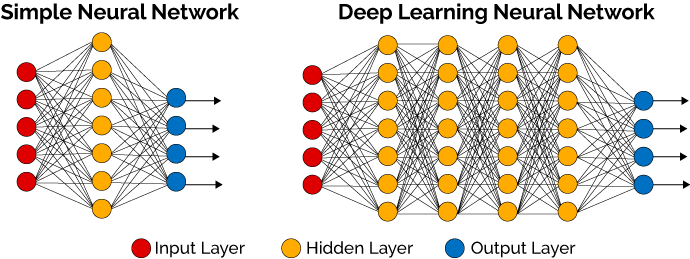
Deep learning will be faster and data collection better

Deep learning will be faster and data collection better


Nowadays, deep learning faces certain challenges associated with the data collection and the complexity of the computations. Innovations in hardware are now being developed to speed up the deep learning experiments, e.g. the new GPUs with a greater number of cores and a different form of architecture. According to Marc Edgar, a Senior Information Scientist at the GE Research, deep training will shorten the development time of software solutions from several months to several days within the next 3-5 years. This will improve the functional characteristics, increase productivity, and reduce product costs.
Currently, most large firms realize the importance of data collection and its influence on the business effectiveness. In the coming year, companies will start using even more data, and the success will depend on the ability to combine the disparate data. In 2018, companies will collect customer data via CRM, ticket systems, BMP and DMP, as well as the omnichannel platforms. The popularity of collecting data on specialized sensors like LIDAR is also on the rise. Integrating the existing systems with all types of client data into a single information pool will definitely be on trend. Startups will continue to create new methods for gathering and using data, further reducing the costs.
Image result for deep learning

IP 101: The Basics of IP Addresses

IP 101: The Basics of IP Addresses


Image result for The Basics of IP Addresses


The "IP" part of IP address stands for "Internet Protocol." The "address" part refers to a unique number that gets linked to all online activity you do...somewhat like a return address on a letter you'd send out. (All this happens in milliseconds.)
That's the end of today's lesson. At least it should be.
Because from this point on, it gets complicated fast. And confusing. Information technology (IT) is crazy stuff and it's best left to those who have to deal with computers and networks.
Still, we're all on the Internet these days, and it seems we're always connected through our personal computers, laptops or mobile devices. And every time you go on the Internet, an IP address is right there, working for you.
And with so much obscure information (and misinformation) out there about the IP address, it's helpful to know the basics.

You've got connections.

Your computer is hooked up to the Internet, one way or the other. When you go online for email, to shop or chat, your request has to be sent out to the right destination, and the responses and information you want need to come back directly to you.
An IP address plays a significant role in that.
You and your computer actually connect to the Internet indirectly: You first connect to a network that is 1) connected to the Internet itself and 2) grants or gives you access to the Internet.
That network might be your Internet service provider (ISP) at home, or a company network at work, or a wireless network at a hotel or coffee shop when you're on the road. But with millions of computers on the Internet, how can your single computer jump right in and get you your work or personal emails and more without any problems?


Protocols are Protocols

To make sure you can do your thing on the Internet, your computer's networking software is hardwired to follow a list of built-in networking standards and rules (yes, protocols) to connect to Internet, and to swap information and data back and forth.
One of those networking protocols on your computer, the Internet Protocol, is responsible for addressing, delivering and routing your online requests precisely. It attaches an "electronic return address" to all your online requests and activity for you. The address it uses is the IP address for your connection.

So long, IP address. It was nice while it lasted.

When you're at home, an IP address is assigned to your computer by your Internet service provider (think Time Warner Cable, Cox Communications, or AT&T). Since they are the ones giving you access to the Internet, it's their role to assign an IP address to your computer. Your Internet activity goes through them, and they route it back to you, using your IP address.
But don't get attached to it. Don't tattoo your IP address to your arm, because it's not really yours. Even at home it can change if you do something as simple as turn your modem or router on and off. Or you can contact your Internet service provider and they can change it for you.

You can't take it with you.

Plus, if you go on vacation and take along your laptop, your home IP address doesn't go with you. It can't, because on vacation you'll be using another network to connect to the Internet.
So, when you're at a coffee shop in another city or state (or just down the road) and you're using their WiFi to get your email, you're using a different (and temporary) IP address, one assigned to your laptop on the fly by the ISP for that coffee shop's Internet provider.
Same thing happens when you travel. As you move from the airport to your hotel to the local coffee house, your IP address will change each and every time.
But you don't have to think about it at all, or open the hood of your computer and flip switches. It all happens thanks to the intelligent design behind the Internet, wireless networks and all those Internet Protocols your computer uses.


Featured Post

Day 41 — BGP Confederations: Sub-AS Design, External View and Migration

1. Opening Confederations are another way to scale BGP inside a large administrative domain. They divide the domain into member autonomous systems while presenting a single confederation identifier to external peers. They are powerful, but their operational model is more complex than simply 'using private ASNs inside.' The engineering goal is not to memorize another BGP command. It is to understand what information each speaker is allowed to propagate, what path information can be hidden, and what failure domain is created by the chosen control-plane architecture . 2. Concept and standards behavior RFC 5065 defines AS_CONFED_SEQUENCE and AS_CONFED_SET and how member-AS relationships are represented. Confederation external sessions have eBGP-like properties inside the confederation, while the confederation is presented externally as one AS. Modern guidance must also account for the fact that RFC 9774 prohibits new origination of AS_SET/AS_CONFED_SET in ordinary aggregation c...