Campus Event Management System in JAVA

 Campus Event Management System

#java #event #fyp #project #source #code #learn #free

1. Introduction

  • Problem Statement: Managing campus events manually can be chaotic and time-consuming. The need for a streamlined digital platform is essential for enhancing user experience and improving event management efficiency.
  • Objective: To create a Java-based Campus Event Management System that allows users to create, manage, and register for campus events seamlessly.
  • Scope: The system will have modules for user registration, event creation, event registration, notifications, and administrative management.

2. Features

  • User Management: Registration, login, and profile management for students and organizers.
  • Event Management: Create, update, delete, and view events.
  • Registration System: Students can register for events, view the status of their registration, and receive notifications.
  • Notification System: Send email or SMS notifications for event updates, cancellations, and reminders.
  • Feedback System: Post-event feedback collection and analysis.

3. System Requirements

  • Software Requirements:
    • JDK 8 or later
    • IDE: Eclipse/IntelliJ IDEA
    • Database: MySQL or PostgreSQL
    • Apache Tomcat for web-based deployment
  • Hardware Requirements:
    • RAM: 4GB minimum
    • Processor: Dual Core Processor or higher
    • Disk Space: 200MB for software and dependencies

4. System Design

  • Architecture: MVC (Model-View-Controller) architecture will be used for the web-based version of the application.
  • UML Diagrams:
    • Use Case Diagram: Illustrates the interaction between users (students, organizers, and admin) and the system.
    • Class Diagram: Shows the classes involved and their relationships.
    • Sequence Diagram: Represents the flow of actions for key functionalities like event registration and notification.
  • Database Design:
    • Tables for Users, Events, Registrations, Notifications, and Feedback.


Project Structure:

  1. Backend (Spring Boot Application)

    • Models
    • Repositories
    • Services
    • Controllers
    • Configuration
  2. Frontend (JavaFX Application)

    • UI Layouts
    • Controllers
    • Utils

1. Backend: Spring Boot Application

Step 1: Create a Spring Boot Project

Use Spring Initializr to generate a new Spring Boot project with the following dependencies:

  • Spring Web
  • Spring Data JPA
  • MySQL Driver
  • Lombok

Step 2: Create Models


user.java


package com.campus.eventmanagement.model;

import lombok.AllArgsConstructor;
import lombok.Data;
import lombok.NoArgsConstructor;
import javax.persistence.*;

@Entity
@Data
@NoArgsConstructor
@AllArgsConstructor
public class User {
    @Id
    @GeneratedValue(strategy = GenerationType.IDENTITY)
    private Long id;

    private String username;
    private String password;
    private String email;
    private String role;  // "STUDENT", "ORGANIZER", "ADMIN"
}


event.java


package com.campus.eventmanagement.model;

import lombok.AllArgsConstructor;
import lombok.Data;
import lombok.NoArgsConstructor;
import javax.persistence.*;
import java.util.Date;

@Entity
@Data
@NoArgsConstructor
@AllArgsConstructor
public class Event {
    @Id
    @GeneratedValue(strategy = GenerationType.IDENTITY)
    private Long eventId;

    private String eventName;
    private String location;

    @Temporal(TemporalType.DATE)
    private Date eventDate;

    private String organizer;
    private String description;
}


UserRepository.java


package com.campus.eventmanagement.repository;

import com.campus.eventmanagement.model.User;
import org.springframework.data.jpa.repository.JpaRepository;
import org.springframework.stereotype.Repository;

@Repository
public interface UserRepository extends JpaRepository<User, Long> {
    User findByUsername(String username);
}


EventRepository.java


package com.campus.eventmanagement.repository;

import com.campus.eventmanagement.model.Event;
import org.springframework.data.jpa.repository.JpaRepository;
import org.springframework.stereotype.Repository;

@Repository
public interface EventRepository extends JpaRepository<Event, Long> {
    // Custom query methods (if needed)
}


UserService.java


package com.campus.eventmanagement.service;

import com.campus.eventmanagement.model.User;
import com.campus.eventmanagement.repository.UserRepository;
import org.springframework.beans.factory.annotation.Autowired;
import org.springframework.stereotype.Service;

import java.util.List;

@Service
public class UserService {
    @Autowired
    private UserRepository userRepository;

    public User registerUser(User user) {
        return userRepository.save(user);
    }

    public User getUserByUsername(String username) {
        return userRepository.findByUsername(username);
    }

    public List<User> getAllUsers() {
        return userRepository.findAll();
    }
}


EventService.java


package com.campus.eventmanagement.service;

import com.campus.eventmanagement.model.Event;
import com.campus.eventmanagement.repository.EventRepository;
import org.springframework.beans.factory.annotation.Autowired;
import org.springframework.stereotype.Service;

import java.util.List;

@Service
public class EventService {
    @Autowired
    private EventRepository eventRepository;

    public Event createEvent(Event event) {
        return eventRepository.save(event);
    }

    public List<Event> getAllEvents() {
        return eventRepository.findAll();
    }

    public void deleteEvent(Long eventId) {
        eventRepository.deleteById(eventId);
    }
}


UserController.java

package com.campus.eventmanagement.controller;

import com.campus.eventmanagement.model.User;
import com.campus.eventmanagement.service.UserService;
import org.springframework.beans.factory.annotation.Autowired;
import org.springframework.web.bind.annotation.*;

import java.util.List;

@RestController
@RequestMapping("/api/users")
public class UserController {
    @Autowired
    private UserService userService;

    @PostMapping("/register")
    public User registerUser(@RequestBody User user) {
        return userService.registerUser(user);
    }

    @GetMapping("/{username}")
    public User getUserByUsername(@PathVariable String username) {
        return userService.getUserByUsername(username);
    }

    @GetMapping("/all")
    public List<User> getAllUsers() {
        return userService.getAllUsers();
    }
}


EventController.java


package com.campus.eventmanagement.controller;

import com.campus.eventmanagement.model.Event;
import com.campus.eventmanagement.service.EventService;
import org.springframework.beans.factory.annotation.Autowired;
import org.springframework.web.bind.annotation.*;

import java.util.List;

@RestController
@RequestMapping("/api/events")
public class EventController {
    @Autowired
    private EventService eventService;

    @PostMapping("/create")
    public Event createEvent(@RequestBody Event event) {
        return eventService.createEvent(event);
    }

    @GetMapping("/all")
    public List<Event> getAllEvents() {
        return eventService.getAllEvents();
    }

    @DeleteMapping("/{eventId}")
    public void deleteEvent(@PathVariable Long eventId) {
        eventService.deleteEvent(eventId);
    }
}


Database Configuration


spring.datasource.url=jdbc:mysql://localhost:3306/event_management_db
spring.datasource.username=root
spring.datasource.password=yourpassword
spring.jpa.hibernate.ddl-auto=update
spring.jpa.show-sql=true
spring.jpa.properties.hibernate.dialect=org.hibernate.dialect.MySQL5Dialect


2. Frontend: JavaFX Application

Step 1: Create the JavaFX Project Structure

Use an IDE like IntelliJ IDEA or Eclipse with JavaFX support.

Step 2: Design UI using FXML

Create a basic UI for the JavaFX application using FXML files. For simplicity, we'll focus on the main screens.


Main.fxml
<?xml version="1.0" encoding="UTF-8"?>
<?import javafx.scene.control.*?>
<?import javafx.scene.layout.*?>

<AnchorPane xmlns:fx="http://javafx.com/fxml" fx:controller="com.campus.eventmanagement.controller.MainController">
    <children>
        <VBox spacing="10">
            <Label text="Campus Event Management System" style="-fx-font-size: 20px;"/>
            <Button text="Register for Event" onAction="#handleRegisterForEvent"/>
            <Button text="View Events" onAction="#handleViewEvents"/>
            <Button text="Create Event" onAction="#handleCreateEvent"/>
        </VBox>
    </children>
</AnchorPane>


MainController.java

package com.campus.eventmanagement.controller;

import javafx.event.ActionEvent;
import javafx.fxml.FXML;
import javafx.scene.control.Alert;

public class MainController {

    @FXML
    private void handleRegisterForEvent(ActionEvent event) {
        // Implementation of registering for an event
        showInfoAlert("Feature Coming Soon!");
    }

    @FXML
    private void handleViewEvents(ActionEvent event) {
        // Implementation of viewing events
        showInfoAlert("Feature Coming Soon!");
    }

    @FXML
    private void handleCreateEvent(ActionEvent event) {
        // Implementation of creating an event
        showInfoAlert("Feature Coming Soon!");
    }

    private void showInfoAlert(String message) {
        Alert alert = new Alert(Alert.AlertType.INFORMATION);
        alert.setTitle("Information");
        alert.setHeaderText(null);
        alert.setContentText(message);
        alert.showAndWait();
    }
}

MainApp.java
package com.campus.eventmanagement;

import javafx.application.Application;
import javafx.fxml.FXMLLoader;
import javafx.scene.Parent;
import javafx.scene.Scene;
import javafx.stage.Stage;

public class MainApp extends Application {
    @Override
    public void start(Stage primaryStage) throws Exception {
        Parent root = FXMLLoader.load(getClass().getResource("/Main.fxml"));
        primaryStage.setTitle("Campus Event Management System");
        primaryStage.setScene(new Scene(root));
        primaryStage.show();
    }

    public static void main(String[] args) {
        launch(args);
    }
}

Step 5: Build and Run

  • Make sure your JavaFX libraries are properly set up in your IDE.
  • Run the Spring Boot backend by executing MainApp.java to start the JavaFX UI.

Summary

This code provides a comprehensive backend using Spring Boot and a basic frontend using JavaFX. The backend includes CRUD operations for users and events, while the frontend includes basic JavaFX layout and event handlers. 

Project: Smart Home Automation System

Project Title: Smart Home Automation System

Project Description:

The Smart Home Automation System is an advanced Java project designed to simulate and manage a smart home environment. This project integrates various components of object-oriented programming (OOP) concepts, multi-threading, networking, database management, GUI development, design patterns, and more. The system enables users to control and monitor home appliances, manage security systems, and optimize energy consumption through a centralized Java-based application.

Key Features:

  • User Authentication: Secure login and registration system with role-based access control.
  • Device Management: Add, remove, and control various smart devices like lights, fans, thermostats, and security cameras.
  • Real-Time Monitoring: Live data streaming from sensors (temperature, motion, etc.) with instant alerts for anomalies.
  • Energy Management: Track and optimize energy consumption with intelligent suggestions and automation rules.
  • Scheduling and Automation: Create schedules for device operations and automate repetitive tasks using a rules engine.
  • Remote Access: Control and monitor the smart home from anywhere via a networked application or web interface.
  • Database Integration: Store user data, device states, logs, and energy usage metrics using an SQL or NoSQL database.
  • Multithreading: Efficient handling of multiple device operations simultaneously using Java's multithreading capabilities.
  • Design Patterns: Implement design patterns such as Singleton, Factory, Observer, and MVC to structure the project effectively.
  • GUI Development: Build an intuitive user interface using JavaFX or Swing, featuring real-time data visualization and control panels.
  • Networking: Establish communication between devices using sockets, and manage remote connections via REST APIs or WebSockets.
  • Security: Encrypt sensitive data and use secure protocols for communication to protect user privacy and system integrity.
  • Logging and Debugging: Implement logging mechanisms to monitor system activities and troubleshoot issues effectively.

Technologies Used:

  • Java SE 11+
  • JavaFX or Swing
  • MySQL / MongoDB
  • Multithreading and Concurrency
  • Socket Programming
  • REST API / WebSocket
  • Design Patterns (Singleton, Factory, Observer, MVC)
  • Encryption and Security Protocols

#JavaProject #SmartHomeAutomation #ObjectOrientedProgramming #Multithreading #JavaFX #Swing #Networking  #DatabaseManagement #DesignPatterns #HomeSecuritySystem #EnergyManagement #IoT #RealTimeMonitoring #JavaCoding #AdvancedJava #JavaSE #JavaDevelopment #JavaGUI #RESTAPI #WebSocket

Here is a comprehensive implementation of a Smart Home Automation System in Java, covering various advanced concepts like multithreading, OOP, GUI, database management, and networking.

Requirements:

  • Java SE 11 or later
  • JavaFX SDK (for GUI)
  • MySQL or MongoDB (for database)
  • Maven (for dependency management)
  • IntelliJ IDEA / Eclipse (for development)
  • JDBC Driver (for MySQL, if using MySQL)

Project Structure:

  1. Model Layer: Contains classes for devices, users, and other entities.
  2. Controller Layer: Manages the system's logic.
  3. View Layer: Handles GUI interactions.
  4. Database Layer: Manages database operations.
  5. Networking Layer: Manages communication between devices and clients.

1. Model Layer: Device, User, and Sensor Classes


package com.smarthome.model; public abstract class Device { private String id; private String name; private boolean status; public Device(String id, String name) { this.id = id; this.name = name; this.status = false; } public String getId() { return id; } public String getName() { return name; } public boolean isStatus() { return status; } public void setStatus(boolean status) { this.status = status; } public abstract void operate(); } class Light extends Device { public Light(String id, String name) { super(id, name); } @Override public void operate() { setStatus(!isStatus()); System.out.println(getName() + " turned " + (isStatus() ? "ON" : "OFF")); } } class Thermostat extends Device { private double temperature; public Thermostat(String id, String name) { super(id, name); this.temperature = 22.0; } public double getTemperature() { return temperature; } public void setTemperature(double temperature) { this.temperature = temperature; System.out.println(getName() + " set to " + temperature + "°C"); } @Override public void operate() { // Custom operation for Thermostat } } class User { private String username; private String password; private String role; public User(String username, String password, String role) { this.username = username; this.password = password; this.role = role; } public String getUsername() { return username; } public String getPassword() { return password; } public String getRole() { return role; } } class Sensor { private String id; private String type; private double value; public Sensor(String id, String type) { this.id = id; this.type = type; } public String getId() { return id; } public String getType() { return type; } public double getValue() { return value; } public void setValue(double value) { this.value = value; } }

2. Controller Layer: SmartHomeController


package com.smarthome.controller; import com.smarthome.model.Device; import com.smarthome.model.User; import java.util.HashMap; import java.util.Map; public class SmartHomeController { private Map<String, Device> devices; private Map<String, User> users; public SmartHomeController() { devices = new HashMap<>(); users = new HashMap<>(); } public void addDevice(Device device) { devices.put(device.getId(), device); } public void addUser(User user) { users.put(user.getUsername(), user); } public void operateDevice(String deviceId) { Device device = devices.get(deviceId); if (device != null) { device.operate(); } else { System.out.println("Device not found"); } } public User authenticate(String username, String password) { User user = users.get(username); if (user != null && user.getPassword().equals(password)) { return user; } return null; } public void listDevices() { devices.values().forEach(device -> { System.out.println(device.getName() + " is " + (device.isStatus() ? "ON" : "OFF")); }); } }

3. View Layer: JavaFX GUI


package com.smarthome.view; import com.smarthome.controller.SmartHomeController; import com.smarthome.model.Light; import com.smarthome.model.Thermostat; import com.smarthome.model.User; import javafx.application.Application; import javafx.scene.Scene; import javafx.scene.control.*; import javafx.scene.layout.GridPane; import javafx.stage.Stage; public class SmartHomeApp extends Application { private SmartHomeController controller; public static void main(String[] args) { launch(args); } @Override public void start(Stage primaryStage) { controller = new SmartHomeController(); controller.addUser(new User("admin", "admin123", "admin")); controller.addDevice(new Light("1", "Living Room Light")); controller.addDevice(new Thermostat("2", "Living Room Thermostat")); primaryStage.setTitle("Smart Home Automation System"); GridPane grid = new GridPane(); grid.setHgap(10); grid.setVgap(10); Label userLabel = new Label("Username:"); TextField userTextField = new TextField(); grid.add(userLabel, 0, 0); grid.add(userTextField, 1, 0); Label passLabel = new Label("Password:"); PasswordField passField = new PasswordField(); grid.add(passLabel, 0, 1); grid.add(passField, 1, 1); Button loginButton = new Button("Login"); grid.add(loginButton, 1, 2); loginButton.setOnAction(e -> { User user = controller.authenticate(userTextField.getText(), passField.getText()); if (user != null) { showDashboard(primaryStage); } else { showAlert("Invalid credentials"); } }); Scene scene = new Scene(grid, 300, 200); primaryStage.setScene(scene); primaryStage.show(); } private void showDashboard(Stage stage) { GridPane grid = new GridPane(); grid.setHgap(10); grid.setVgap(10); Label deviceLabel = new Label("Devices:"); grid.add(deviceLabel, 0, 0); ListView<String> deviceList = new ListView<>(); controller.listDevices().forEach(device -> deviceList.getItems().add(device.getName())); grid.add(deviceList, 1, 0); Button operateButton = new Button("Operate"); grid.add(operateButton, 1, 1); operateButton.setOnAction(e -> { String selectedDevice = deviceList.getSelectionModel().getSelectedItem(); controller.operateDevice(selectedDevice); }); Scene dashboardScene = new Scene(grid, 400, 300); stage.setScene(dashboardScene); } private void showAlert(String message) { Alert alert = new Alert(Alert.AlertType.ERROR); alert.setContentText(message); alert.showAndWait(); } }

4. Database Layer: Database Connection


package com.smarthome.database;

import java.sql.Connection;
import java.sql.DriverManager;
import java.sql.SQLException;

public class DatabaseConnection {
    private static final String URL = "jdbc:mysql://localhost:3306/smarthome";
    private static final String USER = "root";
    private static final String PASSWORD = "password";

    public static Connection getConnection() throws SQLException {
        return DriverManager.getConnection(URL, USER, PASSWORD);
    }
}

5. Networking Layer: Socket Communication

package com.smarthome.networking;

import java.io.*;
import java.net.ServerSocket;
import java.net.Socket;

public class SmartHomeServer {
    private ServerSocket serverSocket;

    public SmartHomeServer(int port) throws IOException {
        serverSocket = new ServerSocket(port);
    }

    public void start() {
        while (true) {
            try {
                Socket clientSocket = serverSocket.accept();
                new ClientHandler(clientSocket).start();
            } catch (IOException e) {
                e.printStackTrace();
            }
        }
    }

    private static class ClientHandler extends Thread {
        private Socket clientSocket;
        private BufferedReader in;
        private PrintWriter out;

        public ClientHandler(Socket socket) {
            this.clientSocket = socket;
        }

        public void run() {
            try {
                in = new BufferedReader(new InputStreamReader(clientSocket.getInputStream()));
                out = new PrintWriter(clientSocket.getOutputStream(), true);

                String inputLine;
                while ((inputLine = in.readLine()) != null) {
                    // Process input and send response
                    out.println("Received: " + inputLine);
                }
            } catch (IOException e) {
                e.printStackTrace();
            } finally {
                try {
                    in.close();
                    out.close();
                    clientSocket.close();
                } catch (IOException e) {
                    e.printStackTrace();
                }
            }
        }
    }

    public static void main(String[] args) {
        try {
            SmartHomeServer server = new SmartHomeServer(8080);
            server.start();
        } catch (IOException e) {
            e.printStackTrace();
        }
    }
}


Setting Up the Project:

  1. Install Java SE 11+: Ensure that you have Java Development Kit (JDK) 11 or later installed.

  2. Set Up JavaFX: Download and configure JavaFX SDK for your IDE (IntelliJ IDEA or Eclipse).

  3. Install MySQL: Install MySQL server and create a database named smarthome. Use the provided DatabaseConnection class for managing connections.

  4. Configure JDBC Driver: Ensure that the MySQL JDBC driver is added to your project’s classpath.

  5. Run the Application:

    • Start the SmartHomeServer to listen for incoming client connections.
    • Run the SmartHomeApp to launch the GUI and start controlling the smart devices.
  6. Maven Dependencies: If using Maven, include the following dependencies in your pom.xml:


<dependencies>
    <dependency>
        <groupId>mysql</groupId>
        <artifactId>mysql-connector-java</artifactId>
        <version>8.0.26</version>
    </dependency>
    <dependency>
        <groupId>org.openjfx</groupId>
        <artifactId>javafx-controls</artifactId>
        <version>16</version>
    </dependency>
</dependencies>


Expanding the Project:

  • Add More Devices: Implement additional device types (e.g., security cameras, smart locks).
  • Enhance Networking: Develop a mobile app or web client to remotely access the smart home system.
  • Improve Security: Implement more sophisticated encryption and user management features.
  • Integrate AI: Incorporate machine learning models to optimize energy usage or predict user behavior.

Encapsulation in JAVA, a Brief explanation

It is a process of wrapping up the data members along with related data handlers method is called Encapsulation.

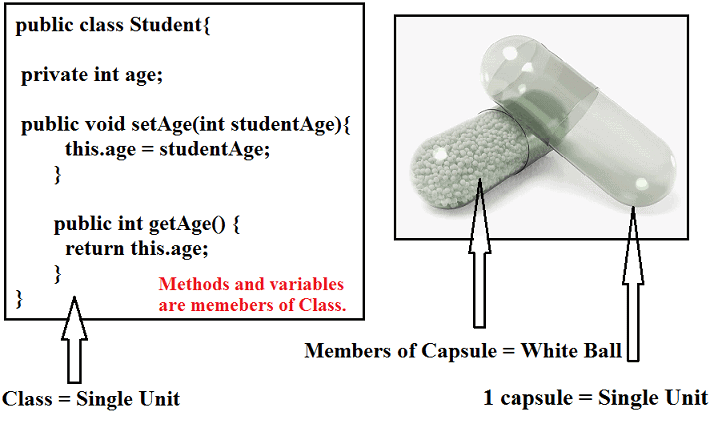
Wrapping up the data members and data handlers method means we are grouping both as a single unit. In Java, we group or wrap both inside the Class, so Class is a single unit that consists of data members as well as methods. As shown in the figure.

So, the class having both data members and related data handler method is called Encapsulated Class.

Here in the above definition, two important terms have been used i.e, data members, and data handlers method.

  • Data members: The variables which are declared inside the class.
  • Data handlers Method: It is just a usual method, whose only purpose is to initialized or return the value of data members present inside the Class. Such types of methods do not use for writing any business logic or functionality.
 #knowledgestreams.blogspot.com

Types of Data Handler Method
  1. Getter Method: It is used to return the value of private data members present in class.
  2. Setter Method: The purpose of this method to initialize or override private data member’s value. With the setter method, you can modify the value of data members.

Don’t worry I explained in detail below.

Let us understand in detail,

In Java we have the concept of Class and Object, so inside the class, we declare some variables and methods, that variable or data members can be accessed easily which the help Object Reference of that class.

We can modify, initialize, and do all different types of operation on that data member.

Since we can directly do any type of changes or modifications with the value of data members, in short, we have the access to data members without any restrictions or without doing any validation of the user, this will give birth to a very big security breach. And you will land up in a horrible situation.

If your application contains confidential data, then Security is a very essential part, so to avoid security breach, it is highly recommended to declare your data members with private access modifiers.

And create a getter and setter method for each data member. So that no one can access directly instead they need to use a getter and setter method to access it.

Once the getter or setter method invoked or called then the very first line of code will perform validation, to identify the right user.

In the above paragraph, one new term has been used that is a private access modifier. Let’s have a quick look into the Access Modifier.

Access Modifier

It is a keyword in java which is used to decide the scope of classes, methods, or data members. Scope refers to visibility or from where you can able to access any of the members of Class which has some access modifier.

In Java, We have in total Four Access Modifiers:

  1. public
  2. private
  3. default
  4. protected

 #knowledgestreams.blogspot.com

1. Public

  • It is the highest visible access modifier in Java.
  • It can be accessed globally, that is from within the class or outside the class or within the package or outside the packages.
  • All the data members in Java can be declared with public access modifier.

2. Private

  • It is the least visible access modifier in Java.
  • The scope of private members is up to class level only that is private members can only be accessed from within the class and cannot be accessed outside the class.
  • Private members cannot even be inherited.
  • The outer class cannot be private but constructor, method, variables can be private.

3. Protected

  • The scope of protected members is the package level.
  • Protected variables and methods can be accessed outside of the package with the help of Inheritance.

4. Default

  • Default is the automatic access modifier in Java, i.e, if any member is not declared as public, private, or protected then it automatically becomes the default.
  • The scope of default member is package level, i.e, default members can only be accessed within the package and cannot be accessed outside the package.
  • All the members in Java can have a default access modifier.

I hope you got some idea about Access Modifiers. Let’s come back to Encapsulation. I was talking about how to prevent the data members from accessing directly.

 So for that, we need to make it private and provide getter and setter methods to access them.

Main Purpose of Encapsulation

The idea of making a data member as private, is that to provide security, so before accessing the data, there must be validation should perform for the login user.

So for this, we created a getter and a setter method, once either of the methods gets called or invoked, the very first step application will validate whether the login user is the right person to access this data, once the validation completed then the user can able to access the data.

In short, we can say, one more layer or wall is added named Validation before data members. Anyone who want to do modification or changes in the data member value, first they have to go through this validation process.

Encapsulation in Java with realtime example

When you input the PIN and press the Enter button, then a method got triggered or invoked, that method first validates your PIN, so once the validation completed.

 It will redirect to the next screen where you have lots of options, such as Balance Enquiry, Amount Withdrawal and many more. Suppose you wanted to withdraw money, once you input your amount and press enter.

 It will trigger one more method, that is setter method, where the first thing again it will validate to proceed further. Similarly for checking the balance, if you press the enter button, the getter method will get invoked and firstly it will also do the validation.

In short with the help of the Encapsulation we can achieve High-Level Security.

But here to achieve security, we are paying something. Have you noticed, each time the validation happened because of that the process will be a little bit slower. See the image for a better understanding.

Rules of Encapsulation

  1. Make the Class public.
  2. Make the data members private.
  3. Every data member must have a public getter and setter methods.

Advantages of Encapsulation

  1. We can achieve Data Hiding.
  2. We can perform Data validation.
  3. We can achieve high-level security.

Note: The Class which fulfills all above condition that class in Java we called Bean Class and Object created for that class is called Bean Object.

Explain the Java Bean Specification?

  1.  A Bean Class must be a public non-abstract class.
  2. The data members present inside the bean class must be of a private access modifier.
  3. Every data member must have a public getter and setter method.
  4. A Bean Class must have a public default constructor.

Here one more important thing I would like to mention, Encapsulation is a combination of two things Data hiding and Abstraction.

How Encapsulation is a combination of two Data hiding and Abstraction?

Let us consider the same ATM example, above Since all logics such as once you press enter after putting the PIN, what method will be triggered you don’t know, and all these processes executed behind the door you don’t have any clue.

 At the same time, you cannot access the data member directly, because it is made private. So in order access, you need a getter or setter method, in short, the data member is hidden behind the method. Hence data hiding has been achieved.

Difference between Abstraction and Encapsulation?

In Abstraction we simply hiding the internal implementation details which are not useful for the users, however, security is not a high priority.

You can easily know what is a thing happening behind the scene you are interested in. But in the case of Encapsulation, the highest priority is given to achieve security. No unauthorized person is allowed to access any kind of data.

Let’s understand with some Real World Example.

Consider four-wheeler vehicles, there are so many small parts assembled to form a complete structure of the vehicle. 

Such as axle, engine, gasoline filter, and many more, but all are hidden under the bonnet/hood of the vehicle. The only important things such as steering wheel, seats, etc.

 Here the hidden things are not restricted from users, even if you want you can easily see everything. And the parts which essential for the users that only exposed. This is nothing but in Java, it is called Abstraction

Although in case of Encapsulation,  even if you are interested to know, logic or algorithm wrote for the application which you browse frequently such as Facebook or Google, then you unable to know as an EndUser, for that, you have joined that companies and be a part of the developer team.

Thus, we can say that Encapsulation is the combination of two terms that is Data Hiding as well as Abstraction


#java #encapsulation #post, #blog #knowledge

EMPLOYEE MANAGEMENT SYSTEM PROJECT CODE

EMPLOYEE MANAGEMENT SYSTEM PROJECT CODE


A - Below is the source code of the project.

B - Create separate class files for every class.

C - Copy the code of one class (ex: login.java) and paste it in Login class file, do it for every class.

#stream #blog #knowledge

1 - Create your first class with name 'conn' and paste the code below in it


 package Employeee;

import java.sql.*;

public class conn{
  
    public Connection c;
    public Statement s;

    public conn(){
        try{
            Class.forName("com.mysql.jdbc.Driver");
            c = DriverManager.getConnection("jdbc:mysql:///project3","root","");
            s = c.createStatement();
        }catch(Exception e) {
            e.printStackTrace();
        }
    }
}


2 - Create second class with name 'Login' and paste the code below in it


package Employeee;

import java.awt.*;
import javax.swing.*;
import java.awt.event.*;
import java.sql.*;

class login  implements ActionListener{

    JFrame f;
    JLabel l1,l2;
    JTextField t1;
    JPasswordField t2;
    JButton b1,b2;

    login(){

        f=new JFrame("Login");

        f.setBackground(Color.white);
        f.setLayout(null);

        l1 = new JLabel("Username");
        l1.setBounds(40,20,100,30);
        f.add(l1);
       
        l2 = new JLabel("Password");
        l2.setBounds(40,70,100,30);
        f.add(l2);

        t1=new JTextField();
        t1.setBounds(150,20,150,30);
        f.add(t1);

        t2=new JPasswordField();
        t2.setBounds(150,70,150,30);
        f.add(t2);
       
        ImageIcon i1 = new ImageIcon(ClassLoader.getSystemResource("Employeee/icons/login.jpg"));
        Image i2 = i1.getImage().getScaledInstance(150,150,Image.SCALE_DEFAULT);
        ImageIcon i3 =  new ImageIcon(i2);
        JLabel l3 = new JLabel(i3);
        l3.setBounds(350,20,150,150);
        f.add(l3);


        b1 = new JButton("Login");
        b1.setBounds(40,140,120,30);
        b1.setFont(new Font("serif",Font.BOLD,15));
        b1.addActionListener(this);
        b1.setBackground(Color.BLACK);
        b1.setForeground(Color.WHITE);
        f.add(b1);

        b2=new JButton("Cancel");
        b2.setBounds(180,140,120,30);
        b2.setFont(new Font("serif",Font.BOLD,15));
        b2.setBackground(Color.BLACK);
        b2.setForeground(Color.WHITE);
        f.add(b2);

        b2.addActionListener(this);
       
        f.getContentPane().setBackground(Color.WHITE);

        f.setVisible(true);
        f.setSize(600,300);
        f.setLocation(400,300);

    }

    public void actionPerformed(ActionEvent ae){

        try{
            conn c1 = new conn();
            String u = t1.getText();
            String v = t2.getText();
           
            String q = "select * from login where username='"+u+"' and password='"+v+"'";
           
            ResultSet rs = c1.s.executeQuery(q);
            if(rs.next()){
                new details().f.setVisible(true);
                f.setVisible(false);
            }else{
                JOptionPane.showMessageDialog(null, "Invalid login");
                f.setVisible(false);
            }
        }catch(Exception e){
            e.printStackTrace();
        }
    }
    public static void main(String[] arg){
        login l=new login();
    }
}


3 - Create next class with name 'Add_Employee'.


package Employeee;

import java.sql.*;
import java.awt.*;
import java.awt.event.*;
import java.io.*;
import javax.swing.*;

class Add_Employee implements ActionListener{

    JFrame f;
    JLabel id,id1,id2,id3,id4,id5,id6,id7,id8,id9,id10,id11,id12,id15,id16,id17,lab,lab1;
    JTextField t,t1,t2,t3,t4,t5,t6,t7,t8,t9,t10,t11,t12,t13;
    JButton b,b1,b2,b3;

    Add_Employee(int i){}
   
    Add_Employee(){
        f = new JFrame("Add Employee");
        f.setBackground(Color.white);
        f.setLayout(null);

        id15=new JLabel();
        id15.setBounds(0,0,900,700);
        id15.setLayout(null);
        ImageIcon img = new ImageIcon(ClassLoader.getSystemResource("Employeee/icons/add_employee.jpg"));
        id15.setIcon(img);

        id8 = new JLabel("New Employee Details");
        id8.setBounds(320,30,500,50);
        id8.setFont(new Font("serif",Font.ITALIC,25));
        id8.setForeground(Color.black);
        id15.add(id8);
        f.add(id15);


        id1 = new JLabel("Name");
        id1.setBounds(50,150,100,30);
        id1.setFont(new Font("serif",Font.BOLD,20));
        id15.add(id1);

        t1=new JTextField();
        t1.setBounds(200,150,150,30);
        id15.add(t1);

        id2 = new JLabel("Father's Name");
        id2.setBounds(400,150,200,30);
        id2.setFont(new Font("serif",Font.BOLD,20));
        id15.add(id2);

        t2=new JTextField();
        t2.setBounds(600,150,150,30);
        id15.add(t2);

        id3= new JLabel("Age");
        id3.setBounds(50,200,100,30);
        id3.setFont(new Font("serif",Font.BOLD,20));
        id15.add(id3);

        t3=new JTextField();
        t3.setBounds(200,200,150,30);
        id15.add(t3);

        id4= new JLabel("Date Of Birth"); 
        id4.setBounds(400,200,200,30);
        id4.setFont(new Font("serif",Font.BOLD,20));
        id15.add(id4);

        t4=new JTextField();
        t4.setBounds(600,200,150,30);
        id15.add(t4);

        id5= new JLabel("Address");
        id5.setBounds(50,250,100,30);
        id5.setFont(new Font("serif",Font.BOLD,20));
        id15.add(id5);

        t5=new JTextField();
        t5.setBounds(200,250,150,30);
        id15.add(t5);

        id6= new JLabel("Phone");
        id6.setBounds(400,250,100,30);
        id6.setFont(new Font("serif",Font.BOLD,20));
        id15.add(id6);

        t6=new JTextField();
        t6.setBounds(600,250,150,30);
        id15.add(t6);

        id7= new JLabel("Email Id");
        id7.setBounds(50,300,100,30);
        id7.setFont(new Font("serif",Font.BOLD,20));
        id15.add(id7);

        t7=new JTextField();
        t7.setBounds(200,300,150,30);
        id15.add(t7);

        id9= new JLabel("Education");
        id9.setBounds(400,300,100,30);
        id9.setFont(new Font("serif",Font.BOLD,20));   
        id15.add(id9);

        t8=new JTextField();
        t8.setBounds(600,300,150,30);
        id15.add(t8);

        id10= new JLabel("Job Post");
        id10.setBounds(50,350,100,30);
        id10.setFont(new Font("serif",Font.BOLD,20));
        id15.add(id10);

        t9=new JTextField();
        t9.setBounds(200,350,150,30);
        id15.add(t9);


        id11= new JLabel("Aadhar No");
        id11.setBounds(400,350,100,30);
        id11.setFont(new Font("serif",Font.BOLD,20));
        id15.add(id11);

        t10=new JTextField();
        t10.setBounds(600,350,150,30);
        id15.add(t10);

        id12= new JLabel("Employee Id");
        id12.setBounds(50,400,150,30);
        id12.setFont(new Font("serif",Font.BOLD,20));
        id15.add(id12);

        t11=new JTextField();  
        t11.setBounds(200,400,150,30);
        id15.add(t11);


        lab=new JLabel();
        lab.setBounds(200,450,250,200);
    id15.add(lab);

        lab1=new JLabel("");
        lab1.setBounds(600,450,250,200);
        id15.add(lab1);

        b = new JButton("Submit");
        b.setBackground(Color.BLACK);
        b.setForeground(Color.WHITE);
        b.setBounds(250,550,150,40);
       
        id15.add(b);

        b1=new JButton("Cancel");  
        b1.setBackground(Color.BLACK);
        b1.setForeground(Color.WHITE);
        b1.setBounds(450,550,150,40);
       
        id15.add(b1);
       
        b.addActionListener(this);
        b1.addActionListener(this);
       
        f.setVisible(true);
        f.setSize(900,700);
        f.setLocation(400,150);
    }

    public void actionPerformed(ActionEvent ae){
       
        String a = t1.getText();
        String bb = t2.getText();
        String c = t3.getText();
        String d = t4.getText();
        String e = t5.getText();
        String ff = t6.getText();
        String g = t7.getText();
        String h = t8.getText();
        String i = t9.getText();
        String j = t10.getText();
        String k = t11.getText();
        if(ae.getSource() == b){
            try{
                conn cc = new conn();
                String q = "insert into employee values('"+a+"','"+bb+"','"+c+"','"+d+"','"+e+"','"+ff+"','"+g+"','"+h+"','"+i+"','"+j+"','"+k+"')";
                cc.s.executeUpdate(q);
                JOptionPane.showMessageDialog(null,"Details Successfully Inserted");
                f.setVisible(false);
                new details();
            }catch(Exception ee){
                System.out.println("The error is:"+ee);
            }
        }else if(ae.getSource() == b1){
            f.setVisible(false);
            new details();
        }
    }
    public static void main(String[ ] arg){
        new Add_Employee();
    }
}


4 - Create next class with name 'Forget_Password'. 


 package Employeee;

import java.sql.*;
import java.awt.*;
import java.awt.event.*;
import javax.swing.*;

class Forget_Password implements ActionListener
{
JFrame f;
JTextField t,t2,t3;
JLabel l,l1,l2,l3,l4,l5;
JButton b,b1,b2;

Forget_Password()
{
f=new JFrame("Forget");

f.setBackground(Color.green);
f.setLayout(null);

l5=new JLabel();
l5.setBounds(0,0,500,500);
l5.setLayout(null);
ImageIcon img=new ImageIcon("5.jpg");
l5.setIcon(img);


l=new JLabel("Id");
l.setVisible(true);
l.setBounds(50,200,50,30);
l.setForeground(Color.white);
Font F1=new Font("serif",Font.BOLD,20);
l.setFont(F1);
l5.add(l);
f.add(l5);
l.setVisible(false);

l1=new JLabel(" Nick name");
l1.setBounds(50,50,150,30);
l1.setForeground(Color.white);
Font F2=new Font("serif",Font.BOLD,30);
l1.setFont(F2);
l5.add(l1);

l2=new JLabel("New Password");
l2.setBounds(50,250,200,30);
l2.setForeground(Color.white);
Font F3=new Font("serif",Font.BOLD,20);
l2.setFont(F3);
l2.setVisible(false);
l5.add(l2);


l3=new JLabel("Confirm Password");
l3.setBounds(50,300,250,30);
l3.setForeground(Color.white);
Font F4=new Font("serif",Font.BOLD,20);
l3.setFont(F4);
l3.setVisible(false);
l5.add(l3);

t=new JTextField();
t.setBounds(250,50,150,30);
l5.add(t);

 l4=new JLabel("admin@123");
l4.setBounds(300,200,150,30);
Font F5=new Font("serif",Font.BOLD,20);
l4.setForeground(Color.white);
l4.setFont(F5);
l4.setVisible(false);
l5.add(l4);


 t2=new JTextField();
t2.setBounds(300,250,150,30);
t2.setVisible(false);
l5.add(t2);

 t3=new JTextField();
t3.setBounds(300,300,150,30);
t3.setVisible(false);
l5.add(t3);

b=new JButton("Search");
b.setBounds(250,100,100,30);
b.addActionListener(this);
l5.add(b);


b1=new JButton("Submit");
b1.setBounds(120,370,100,30);
b1.addActionListener(this);
l5.add(b1);
b1.setVisible(false);

b2=new JButton("Cancel");
b2.setBounds(260,370,100,30);
b2.addActionListener(this);
l5.add(b2);
b2.setVisible(false);

f.setSize(500,500);
f.setLocation(300,50);
f.setVisible(true);

}

public void actionPerformed(ActionEvent ae)
{

if(ae.getSource()==b2)
{
f.setVisible(false);
login l=new login();
}

if(ae.getSource()==b)
{
l.setVisible(true);
l2.setVisible(true);
l3.setVisible(true);
l4.setVisible(true);
b1.setVisible(true);
b2.setVisible(true);
}

}
public static void main(String[]ar)
{
Forget_Password f=new Forget_Password();
}
}


 5 - Create next class with name 'Front_Page' and place the code below


 package Employeee;

import java.awt.*;
import javax.swing.*;
import java.lang.Thread;
import java.awt.event.*;

class Front_Page implements ActionListener{
    JFrame f;
    JLabel id,l1;
    JButton b;

    Front_Page(){

        f=new JFrame("Employee Management System");
        f.setBackground(Color.red);
        f.setLayout(null);
      
        ImageIcon i1 = new ImageIcon(ClassLoader.getSystemResource("Employeee/icons/front.jpg"));
        Image i2 = i1.getImage().getScaledInstance(1200,700,Image.SCALE_DEFAULT);
        ImageIcon i3 = new ImageIcon(i2);
        JLabel l1 = new JLabel(i3);
      
        l1.setBounds(0,150,1360,530);
        f.add(l1);


        b = new JButton("CLICK HERE TO CONTINUE");
        b.setBackground(Color.BLACK);
        b.setForeground(Color.WHITE);
      

        b.setBounds(500,600,300,70);
        b.addActionListener(this);

        id=new JLabel();
        id.setBounds(0,0,1360,750);
        id.setLayout(null);


        JLabel lid=new JLabel("EMPLOYEE MANAGEMENT SYSTEM");
        lid.setBounds(80,30,1500,100);
        lid.setFont(new Font("serif",Font.PLAIN,70));
        lid.setForeground(Color.red);
        id.add(lid);

        id.add(b);
        f.add(id);
      
      
        f.getContentPane().setBackground(Color.WHITE);

        f.setVisible(true);
        f.setSize(1360,750);
        f.setLocation(200,100);

        while(true){
            lid.setVisible(false); // lid =  j label
            try{
                Thread.sleep(500); //1000 = 1 second
            }catch(Exception e){}
            lid.setVisible(true);
            try{
                Thread.sleep(500);
            }catch(Exception e){}
        }

    }
    public void actionPerformed(ActionEvent ae){

        if(ae.getSource()==b){
            f.setVisible(false);
            new login();  
        }
    }

    public static void main(String[] arg){
        Front_Page f = new Front_Page();
    }
}


6 - Create next class  with name 'Print_Data'


package Employeee;

import java.awt.*;
import javax.swing.*;
import java.awt.event.*;
import java.sql.*;

class Print_Data implements ActionListener{
    JFrame f;
    JLabel id8,id,aid,id1,aid1,id2,aid2,id3,aid3,id4,aid4,id5,aid5,id6,aid6,id7,aid7,id9,id10,id11,id12,id13,id14,id15,id16,id17,lab;
    String emp_id,name,father,address,phone,email,education,post,age,dob,aadhar;
    JButton b1,b2;
    ImageIcon icon;

    Print_Data(String e_id){
        try{
            conn con = new conn();
            String str = "select * from employee where emp_id = '"+e_id+"'";
            ResultSet rs= con.s.executeQuery(str);

            while(rs.next()){

              
                name = rs.getString("name");
                father = rs.getString("fname");
                age = rs.getString("age");
                dob = rs.getString("dob");
                address = rs.getString("addess");
                phone = rs.getString("phone");
                email = rs.getString("email");
                education = rs.getString("education");
                post = rs.getString("post");
                aadhar = rs.getString("aadhar");
                emp_id = rs.getString("emp_id");
            }
        }catch(Exception e){
            e.printStackTrace();
        }

        f=new JFrame("Print Data");
        f.setVisible(true);
        f.setSize(595,642);
        f.setLocation(450,200);
        f.setBackground(Color.white);
        f.setLayout(null);


        id9=new JLabel();
        id9.setBounds(0,0,595,642);
        id9.setLayout(null);
        ImageIcon img=new ImageIcon(ClassLoader.getSystemResource("Employeee/icons/print.jpg"));
        id9.setIcon(img);

        id8 = new JLabel("Employee Details");
        id8.setBounds(50,10,250,30);
        f.add(id8);
        id8.setFont(new Font("serif",Font.BOLD,25));
        id9.add(id8);
        f.add(id9);

        id = new JLabel("Employee Id:");
        id.setBounds(50,70,120,30);
        id.setFont(new Font("serif",Font.BOLD,20));
        id9.add(id);

        aid = new JLabel(emp_id);
        aid.setBounds(200,70,200,30);
        aid.setFont(new Font("serif",Font.BOLD,20));
        id9.add(aid);

        id1 = new JLabel("Name:");
        id1.setBounds(50,120,100,30);
        id1.setFont(new Font("serif",Font.BOLD,20));
        id9.add(id1);

        aid1 = new JLabel(name);
        aid1.setBounds(200,120,300,30);
        aid1.setFont(new Font("serif",Font.BOLD,20));
        id9.add(aid1);

 
        id2 = new JLabel("Father's Name:");
        id2.setBounds(50,170,200,30);
        id2.setFont(new Font("serif",Font.BOLD,20));
        id9.add(id2);

        aid2 = new JLabel(father);
        aid2.setBounds(200,170,300,30);
        aid2.setFont(new Font("serif",Font.BOLD,20));
        id9.add(aid2);

        id3= new JLabel("Address:");
        id3.setBounds(50,220,100,30);
        id3.setFont(new Font("serif",Font.BOLD,20));
        id9.add(id3);

        aid3= new JLabel(address);
        aid3.setBounds(200,220,300,30);
        aid3.setFont(new Font("serif",Font.BOLD,20));
        id9.add(aid3);


        id4= new JLabel("Mobile No:"); 
        id4.setBounds(50,270,100,30);
        id4.setFont(new Font("serif",Font.BOLD,20));
        id9.add(id4);

        aid4= new JLabel(phone);
        aid4.setBounds(200,270,300,30);
        aid4.setFont(new Font("serif",Font.BOLD,20));
        id9.add(aid4);

       
        id5= new JLabel("Email Id:");
        id5.setBounds(50,320,100,30);
        id5.setFont(new Font("serif",Font.BOLD,20));
        id9.add(id5);

        aid5= new JLabel(email);
        aid5.setBounds(200,320,300,30);
        aid5.setFont(new Font("serif",Font.BOLD,20));
        id9.add(aid5);

       
        id6= new JLabel("Education:");
        id6.setBounds(50,370,100,30);
        id6.setFont(new Font("serif",Font.BOLD,20));
        id9.add(id6);

        aid6= new JLabel(education);
        aid6.setBounds(200,370,300,30);
        aid6.setFont(new Font("serif",Font.BOLD,20));
        id9.add(aid6);


        id7= new JLabel("Job Post:");
        id7.setBounds(50,420,100,30);
        id7.setFont(new Font("serif",Font.BOLD,20));
        id9.add(id7);

        aid7= new JLabel(post);
        aid7.setBounds(200,420,300,30);
        aid7.setFont(new Font("serif",Font.BOLD,20));
        id9.add(aid7);

       
        b1=new JButton("Print");
        b1.setBackground(Color.BLACK);
        b1.setForeground(Color.WHITE);
        b1.setBounds(100,520,100,30);
        b1.addActionListener(this);
        id9.add(b1);

        b2=new JButton("cancel");
        b2.setBackground(Color.BLACK);
        b2.setForeground(Color.WHITE);
        b2.setBounds(250,520,100,30);
        b2.addActionListener(this);
        id9.add(b2);


    }

    public void actionPerformed(ActionEvent ae){

        if(ae.getSource()==b1){
            JOptionPane.showMessageDialog(null,"printed successfully");
            f.setVisible(false);
            details d=new details();
        }
        if(ae.getSource()==b2){
            f.setVisible(false);
            new View_Employee();
        }
    }
    public static void main(String[] args){
        new Print_Data("Print Data");
    }

}


7 - Create next class with name 'Remove_Employee'


package Employeee;

import java.sql.*;
import java.awt.*;
import java.awt.event.*;
import javax.swing.*;

class Remove_Employee implements ActionListener{
    JFrame f;
    JTextField t;
    JLabel l1,l2,l3,l4,l5,l6,l7,l8;
    JButton b,b1,b2,b3;

    Remove_Employee(){
        f=new JFrame("Remove Employee");
        f.setBackground(Color.green);  
        f.setLayout(null);

        l5=new JLabel();
        l5.setBounds(0,0,500,500);
        l5.setLayout(null);
        ImageIcon img=new ImageIcon(ClassLoader.getSystemResource("Employeee/icons/remove.jpg"));
        l5.setIcon(img);
        f.add(l5);

       
        l1=new JLabel("Employee Id");
        l1.setBounds(50,50,250,30);
        l1.setForeground(Color.white);
        Font f2 = new Font("serif",Font.BOLD,25);
        l1.setFont(f2);
        l5.add(l1);

        t=new JTextField();
        t.setBounds(250,50,150,30);
        l5.add(t);


        b=new JButton("Search");
        b.setBounds(200,100,100,30);
        b.addActionListener(this);
        l5.add(b);

        b3=new JButton("back");
        b3.setBounds(360,100,100,30);  
        b3.addActionListener(this);
        l5.add(b3);


        l2=new JLabel("Name:");
        l2.setBounds(50,150,250,30);
        l2.setForeground(Color.white);
        Font f3 = new Font("serif",Font.BOLD,20);
        l2.setFont(f3);
        l5.add(l2);

        l6=new JLabel();   
        l6.setBounds(200,150,350,30);
        l6.setForeground(Color.white);
        Font F6=new Font("serif",Font.BOLD,20);
        l6.setFont(F6);
        l5.add(l6);

        l3=new JLabel("Mobile No:");
        l3.setBounds(50,200,250,30);
        l3.setForeground(Color.white);
        Font f4 = new Font("serif",Font.BOLD,20);
        l3.setFont(f4);
        l5.add(l3);


        l7=new JLabel();
        l7.setBounds(200,200,350,30);
        l7.setForeground(Color.white);
        Font F7=new Font("serif",Font.BOLD,20);
        l7.setFont(F7);
        l5.add(l7);


        l4=new JLabel("Email Id:");
        l4.setBounds(50,250,250,30);
        l4.setForeground(Color.white);
        Font F5=new Font("serif",Font.BOLD,20);
        l4.setFont(F5);
        l5.add(l4);

        l8=new JLabel();
        l8.setBounds(200,250,350,30);
        l8.setForeground(Color.white);
        Font f8=new Font("serif",Font.BOLD,20);
        l8.setFont(f8);
        l5.add(l8);

        b1=new JButton("Remove");
        b1.setBounds(120,300,100,30);
        b1.addActionListener(this);
        l5.add(b1);

visit my blog at Know  Knowledgestreams.blogspot.com
        b2=new JButton("Cancel");
        b2.setBounds(300,300,100,30);
        b2.addActionListener(this);
        l5.add(b2);
        l2.setVisible(false);
        l3.setVisible(false);
        l4.setVisible(false);
        b1.setVisible(false);
        b2.setVisible(false);

        f.setSize(500,500);
        f.setLocation(500,250); 
        f.setVisible(true);
    }
   
    public void actionPerformed(ActionEvent ae){

        if(ae.getSource()==b){
            try{
                conn con = new conn();
                String str = "select name,phone,email from employee where emp_id ='"+t.getText()+"' ";
                ResultSet rs = con.s.executeQuery(str);

                int i=0;
                if(rs.next()){
                    String name = rs.getString(1);
                    String mob = rs.getString(2);
                    String email=rs.getString(3);

                    l2.setVisible(true);
                    l3.setVisible(true);
                    l4.setVisible(true);
                    b1.setVisible(true);
                    b2.setVisible(true);   
                    i=1;
                    l6.setText(name);
                    l7.setText(mob);
                    l8.setText(email);
                }
                if(i==0)
                    JOptionPane.showMessageDialog(null,"Id not found");
            }catch(Exception ex){}
        }
        if(ae.getSource()==b1){
            try{
                conn con = new conn();
                String str = "delete from employee where emp_id = '"+t.getText()+"'";
                con.s.executeUpdate(str);
                JOptionPane.showMessageDialog(null,"deleted successfully");
                l2.setVisible(false);
                l3.setVisible(false);
                l4.setVisible(false);
                l6.setVisible(false);
                l7.setVisible(false);
                l8.setVisible(false);
                b1.setVisible(false);
                b2.setVisible(false);

            }catch(Exception ex){
                JOptionPane.showMessageDialog(null,"Exception occured while delting record "+ex);
            }
        }
        if(ae.getSource()==b2){
            f.setVisible(false);
            details d=new details();
        }
        if(ae.getSource()==b3){
            f.setVisible(false);
            details d=new details();
        }
    }

    public static void main(String[]ar){
        new Remove_Employee();
    }
}


8 - Create next class 'Search_Employee'


visit my blog at Know  Knowledgestreams.blogspot.com

package Employeee;

import java.awt.*;
import java.awt.event.*;
import javax.swing.*;

class Search_Employee implements ActionListener{
    JFrame f;
    JTextField t;
    JLabel l,l5;
    JButton b,b2;

    Search_Employee(){
        f=new JFrame("search");
        f.setBackground(Color.green);
        f.setLayout(null);

        l5=new JLabel();
        l5.setBounds(0,0,500,270);
        l5.setLayout(null);
        ImageIcon img=new ImageIcon(ClassLoader.getSystemResource("Employeee/icons/view.jpg"));
        l5.setIcon(img);

visit my blog at Know  Knowledgestreams.blogspot.com
        l=new JLabel("Employee Id");
        l.setVisible(true);
        l.setBounds(40,50,250,30);
        l.setForeground(Color.white);
        Font F1=new Font("serif",Font.BOLD,25);
        l.setFont(F1);
        l5.add(l);
        f.add(l5);

        t=new JTextField();
        t.setBounds(240,50,220,30);
        l5.add(t);

        b=new JButton("Search");
        b.setBounds(240,150,100,30);
        b.addActionListener(this);
        l5.add(b);


        b2=new JButton("Cancel");
        b2.setBounds(360,150,100,30);
        b2.addActionListener(this);
        l5.add(b2);

        f.setSize(500,270);
        f.setLocation(450,250);
        f.setVisible(true);
    }

    public void actionPerformed(ActionEvent ae){
        if(ae.getSource()==b2){
            f.setVisible(false);
            details d=new details();
        }
        if(ae.getSource()==b){
            new Update_Employee(t.getText());
            f.setVisible(false);
        }

    }
   
    public static void main(String[]ar){
        new Search_Employee();
    }    
}


visit my blog at Know  Knowledgestreams.blogspot.com


9 - Create next class with name 'Update_Employee'


package Employeee;

import java.awt.*;
import java.sql.*;
import javax.swing.*;
import java.awt.event.*;

class Update_Employee extends Add_Employee implements ActionListener{

    JFrame f;
    JLabel id,id1,id2,id3,id4,id5,id6,id7,id8,id9,id10,id11,id12,id15,lab,lab1;
    JTextField t,t1,t2,t3,t4,t5,t6,t7,t8,t9,t10,t11;
    JButton b,b1,b2,b3;
    String id_emp;

    Update_Employee(String idaa){
        super(0);
        f=new JFrame("update Employee details");
        f.setVisible(true);
        f.setSize(900,500);
        f.setLocation(450,250);
        f.setBackground(Color.white);
        f.setLayout(null);
visit my blog at Know  Knowledgestreams.blogspot.com
        id_emp=idaa;   
        id15=new JLabel();
        id15.setBounds(0,0,900,500);
        id15.setLayout(null);
        ImageIcon img=new ImageIcon(ClassLoader.getSystemResource("Employeee/icons/add_employee.jpg"));
        id15.setIcon(img);

        id8 = new JLabel("Update Employee Detail:");
        id8.setBounds(50,10,500,50);
        id8.setFont(new Font("serif",Font.ITALIC,40));
        id8.setForeground(Color.black);
        id15.add(id8);
        f.add(id15);


        id1 = new JLabel("Name:"); 
        id1.setBounds(50,100,100,30);
        id1.setFont(new Font("serif",Font.BOLD,20));
        id15.add(id1);

        t1=new JTextField();
        t1.setBounds(200,100,150,30);
        id15.add(t1);

        id2 = new JLabel("Father's Name:");
        id2.setBounds(400,100,200,30);
        id2.setFont(new Font("serif",Font.BOLD,20));
        id15.add(id2);

        t2=new JTextField();
        t2.setBounds(600,100,150,30);
        id15.add(t2);

        id3= new JLabel("Address:");
        id3.setBounds(50,150,100,30);
        id3.setFont(new Font("serif",Font.BOLD,20));
        id15.add(id3);

        t3=new JTextField();
        t3.setBounds(200,150,150,30);
        id15.add(t3);

        id4= new JLabel("Mobile No:");
        id4.setBounds(400,150,100,30);
        id4.setFont(new Font("serif",Font.BOLD,20));
        id15.add(id4);

        t4=new JTextField();
        t4.setBounds(600,150,150,30);  
        id15.add(t4);

        id5= new JLabel("Email Id:");
        id5.setBounds(50,200,100,30);
        id5.setFont(new Font("serif",Font.BOLD,20));
        id15.add(id5);
visit my blog at Know  Knowledgestreams.blogspot.com
        t5=new JTextField();
        t5.setBounds(200,200,150,30);
        id15.add(t5);

        id6= new JLabel("Education:");
        id6.setBounds(400,200,100,30);
        id6.setFont(new Font("serif",Font.BOLD,20));   
        id15.add(id6);

        t6=new JTextField();
        t6.setBounds(600,200,150,30);
        id15.add(t6);

        id7= new JLabel("Job Post:");
        id7.setBounds(50,250,100,30);
        id7.setFont(new Font("serif",Font.BOLD,20));
        id15.add(id7);

        t7=new JTextField();
        t7.setBounds(200,250,150,30);
        id15.add(t7);

        id9= new JLabel("Aadhar No:");
        id9.setBounds(400,250,100,30); 
        id9.setFont(new Font("serif",Font.BOLD,20));
        id15.add(id9);

        t8=new JTextField();
        t8.setBounds(600,250,150,30);
        id15.add(t8);

        id10= new JLabel("Employee Id:");
        id10.setBounds(50,300,150,30);
        id10.setFont(new Font("serif",Font.BOLD,20));
        id15.add(id10);
        f.setVisible(false);
        t9=new JTextField();
        t9.setBounds(200,300,150,30);
        id15.add(t9);

        b=new JButton("update");
        b.setBounds(250,400,100,30);
        b.addActionListener(this);
        id15.add(b);
visit my blog at Know  Knowledgestreams.blogspot.com
        b1=new JButton("Cancel");
        b1.setBounds(450,400,100,30);
        b1.addActionListener(this);
        id15.add(b1);

        showData(idaa);
    }

    int i=0;
    String age,dat;

    void showData(String s){
        try{
            conn con = new conn();
            String str = "select * from employee where emp_id = '"+s+"'";
            ResultSet rs = con.s.executeQuery(str);

            if(rs.next()){
                f.setVisible(true);
                i=1;

                t1.setText(rs.getString(1));
                t2.setText(rs.getString(2));
                t3.setText(rs.getString(5));
                t4.setText(rs.getString(6));
                t5.setText(rs.getString(7));
                t6.setText(rs.getString(8));
                t7.setText(rs.getString(9));
                t8.setText(rs.getString(10));
                t9.setText(rs.getString(11));

                age=rs.getString(3);
                dat=rs.getString(4);
            }
            if(i==0)
                JOptionPane.showMessageDialog(null,"Id not found");
            new Search_Employee();
        }catch(Exception ex){}
        f.setVisible(true);
        f.setSize(900,500);
        f.setLocation(400,100);
    }

    public void actionPerformed(ActionEvent ae){
        if(ae.getSource()==b && i==1){
            try{
                conn con = new conn();
                String str = "update employee set name='"+t1.getText()+"',fname='"+t2.getText()+"',age='"+age+"',dob='"+dat+"',addess='"+t3.getText()+"',phone='"+t4.getText()+"',email='"+t5.getText()+"',education='"+t6.getText()+"',post='"+t7.getText()+"',aadhar='"+t8.getText()+"',emp_id='"+t9.getText()+"' where emp_id='"+id_emp+"'";
                con.s.executeUpdate(str);
                JOptionPane.showMessageDialog(null,"successfully updated");
                f.setVisible(false);
                new Search_Employee();
            }catch(Exception e){
                System.out.println("The error is:"+e);
            }
        }
        if(ae.getSource()==b1){
            f.setVisible(false);
            details d=new details();
        }
    }

    public static void main(String[] arg){
        new Update_Employee("Update Employee");
    }
}


visit my blog at Know  Knowledgestreams.blogspot.com
10 - Next class is with name 'View_Employee'

visit my blog at Know  Knowledgestreams.blogspot.com

package Employeee;

import java.awt.*;
import java.awt.event.*;
import javax.swing.*;

class View_Employee implements ActionListener{

    JFrame f;
    JTextField t;
    JLabel l1,l2;
    JButton b,b2;

    View_Employee(){
        f=new JFrame("View");
        f.setBackground(Color.green);
        f.setLayout(null);

        l1=new JLabel();
        l1.setBounds(0,0,500,270);
        l1.setLayout(null);
        ImageIcon img=new ImageIcon(ClassLoader.getSystemResource("Employeee/icons/view.jpg"));
        l1.setIcon(img);


        l2=new JLabel("Employee Id");
        l2.setVisible(true);
        l2.setBounds(40,60,250,30);
        l2.setForeground(Color.white);
        Font F1 = new Font("serif",Font.BOLD,30);
        l2.setFont(F1);
        l1.add(l2);
        f.add(l1);


        t=new JTextField();
        t.setBounds(240,60,220,30);
        l1.add(t);

        b=new JButton("Search");
        b.setBounds(240,150,100,30);
        b.addActionListener(this);
        l1.add(b);

        b2=new JButton("Cancel");
        b2.setBounds(360,150,100,30);
        b2.addActionListener(this);
        l1.add(b2);

        f.setSize(500,270);
        f.setLocation(450,250);
        f.setVisible(true);
    }
   
    public void actionPerformed(ActionEvent ae){

        if(ae.getSource()==b2){
            f.setVisible(false);
            details d=new details();
        }
        if(ae.getSource()==b){
            f.setVisible(false);
            Print_Data p=new Print_Data(t.getText());
        }

    }

    public static void main(String[]ar){
        View_Employee v=new View_Employee();
    }
}


visit my blog at Know  Knowledgestreams.blogspot.com

11 - Next class is 'details'


 package Employeee;

import java.awt.*;
import javax.swing.*;
import java.awt.event.*;

class details  implements ActionListener{

    JFrame f;
    JLabel l1,l2;
    JButton b1,b2,b3,b4;

    details(){
        f=new JFrame("Employee Detail");
        f.setBackground(Color.white);
        f.setLayout(null);

        l1 = new JLabel();
        l1.setBounds(0,0,700,500);
        l1.setLayout(null);
        ImageIcon i1 = new ImageIcon(ClassLoader.getSystemResource("Employeee/icons/details.jpg"));
        l1.setIcon(i1);
        f.add(l1);

        l2 = new JLabel("Employee Details");
        l2.setBounds(430,20,200,40);
        l2.setFont(new Font("serif",Font.BOLD,25));
        l2.setForeground(Color.black);
        l1.add(l2);

        b1=new JButton("Add");
        b1.setBounds(420,80,100,40);
        b1.setFont(new Font("serif",Font.BOLD,15));
        b1.addActionListener(this);
        l1.add(b1);


        b2=new JButton("View");
        b2.setBounds(530,80,100,40);
        b2.setFont(new Font("serif",Font.BOLD,15));
        b2.addActionListener(this);
        l1.add(b2);

        b3=new JButton("Remove");
        b3.setBounds(420,140,100,40);
        b3.setFont(new Font("serif",Font.BOLD,15));
        b3.addActionListener(this);
        l1.add(b3);

        b4=new JButton("Update");
        b4.setBounds(530,140,100,40);
        b4.setFont(new Font("serif",Font.BOLD,15));
        b4.addActionListener(this);
        l1.add(b4);

        f.setVisible(true);
        f.setSize(700,500);
        f.setLocation(450,200);

    }

    public void actionPerformed(ActionEvent ae){
        if(ae.getSource()==b1){
            f.setVisible(false);
            new Add_Employee();
        }
        if(ae.getSource()==b2){
            f.setVisible(false);
            new View_Employee();
        }
        if(ae.getSource()==b3){
            f.setVisible(false);
            new Remove_Employee();
        }
        if(ae.getSource()==b4){
            f.setVisible(false);
            new Search_Employee();
        }
    }

    public static void main(String[ ] arg){
        details d = new details();
    }
}


#employee #management #system #java #source_code #free


Knowledgestreams.blogspot.com

visit my blog at Know  Knowledgestreams.blogspot.com

Featured Post

Day 41 — BGP Confederations: Sub-AS Design, External View and Migration

1. Opening Confederations are another way to scale BGP inside a large administrative domain. They divide the domain into member autonomous systems while presenting a single confederation identifier to external peers. They are powerful, but their operational model is more complex than simply 'using private ASNs inside.' The engineering goal is not to memorize another BGP command. It is to understand what information each speaker is allowed to propagate, what path information can be hidden, and what failure domain is created by the chosen control-plane architecture . 2. Concept and standards behavior RFC 5065 defines AS_CONFED_SEQUENCE and AS_CONFED_SET and how member-AS relationships are represented. Confederation external sessions have eBGP-like properties inside the confederation, while the confederation is presented externally as one AS. Modern guidance must also account for the fact that RFC 9774 prohibits new origination of AS_SET/AS_CONFED_SET in ordinary aggregation c...