Encapsulation in JAVA, a Brief explanation

It is a process of wrapping up the data members along with related data handlers method is called Encapsulation.

Wrapping up the data members and data handlers method means we are grouping both as a single unit. In Java, we group or wrap both inside the Class, so Class is a single unit that consists of data members as well as methods. As shown in the figure.
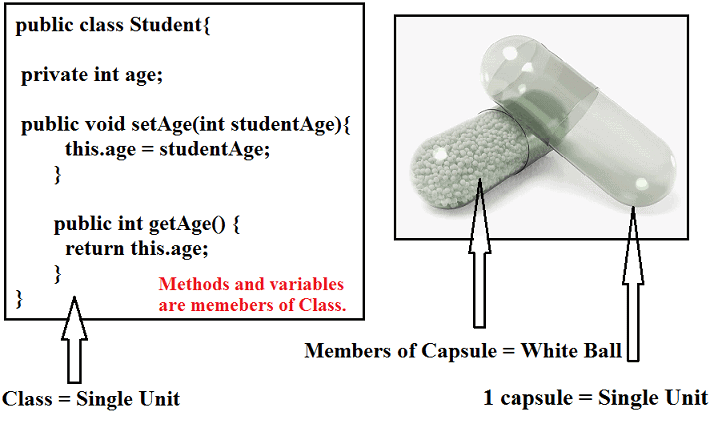
So, the class having both data members and related data handler method is called Encapsulated Class.

Here in the above definition, two important terms have been used i.e, data members, and data handlers method.

  • Data members: The variables which are declared inside the class.
  • Data handlers Method: It is just a usual method, whose only purpose is to initialized or return the value of data members present inside the Class. Such types of methods do not use for writing any business logic or functionality.
 #knowledgestreams.blogspot.com

Types of Data Handler Method
  1. Getter Method: It is used to return the value of private data members present in class.
  2. Setter Method: The purpose of this method to initialize or override private data member’s value. With the setter method, you can modify the value of data members.
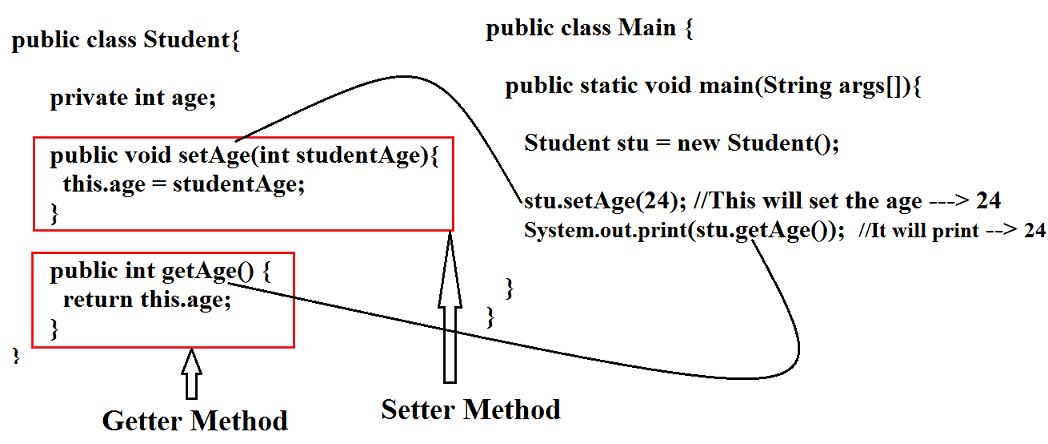
Don’t worry I explained in detail below.

Let us understand in detail,

In Java we have the concept of Class and Object, so inside the class, we declare some variables and methods, that variable or data members can be accessed easily which the help Object Reference of that class.

We can modify, initialize, and do all different types of operation on that data member.

Since we can directly do any type of changes or modifications with the value of data members, in short, we have the access to data members without any restrictions or without doing any validation of the user, this will give birth to a very big security breach. And you will land up in a horrible situation.

If your application contains confidential data, then Security is a very essential part, so to avoid security breach, it is highly recommended to declare your data members with private access modifiers.

And create a getter and setter method for each data member. So that no one can access directly instead they need to use a getter and setter method to access it.

Once the getter or setter method invoked or called then the very first line of code will perform validation, to identify the right user.

In the above paragraph, one new term has been used that is a private access modifier. Let’s have a quick look into the Access Modifier.

Access Modifier

It is a keyword in java which is used to decide the scope of classes, methods, or data members. Scope refers to visibility or from where you can able to access any of the members of Class which has some access modifier.
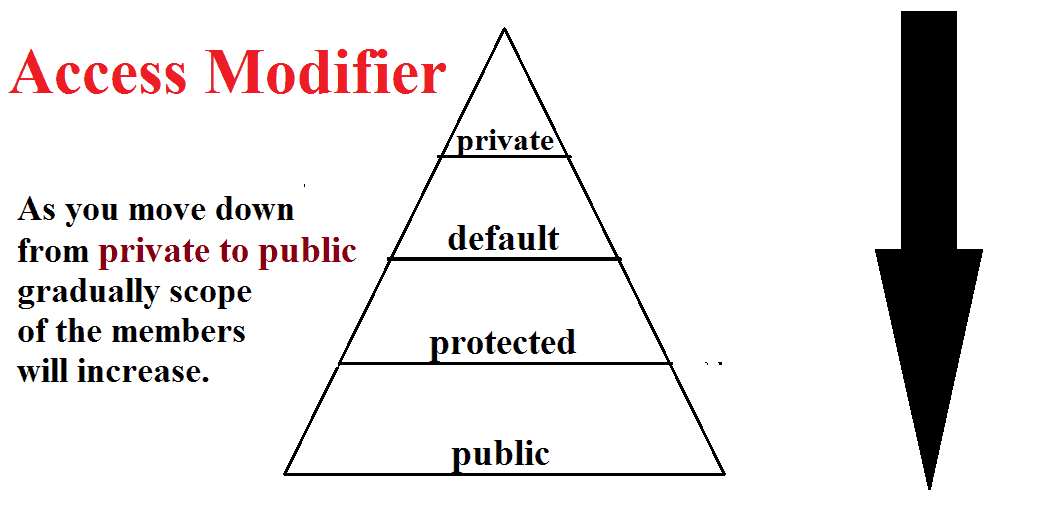
In Java, We have in total Four Access Modifiers:

  1. public
  2. private
  3. default
  4. protected

 #knowledgestreams.blogspot.com

1. Public

  • It is the highest visible access modifier in Java.
  • It can be accessed globally, that is from within the class or outside the class or within the package or outside the packages.
  • All the data members in Java can be declared with public access modifier.

2. Private

  • It is the least visible access modifier in Java.
  • The scope of private members is up to class level only that is private members can only be accessed from within the class and cannot be accessed outside the class.
  • Private members cannot even be inherited.
  • The outer class cannot be private but constructor, method, variables can be private.

3. Protected

  • The scope of protected members is the package level.
  • Protected variables and methods can be accessed outside of the package with the help of Inheritance.

4. Default

  • Default is the automatic access modifier in Java, i.e, if any member is not declared as public, private, or protected then it automatically becomes the default.
  • The scope of default member is package level, i.e, default members can only be accessed within the package and cannot be accessed outside the package.
  • All the members in Java can have a default access modifier.

I hope you got some idea about Access Modifiers. Let’s come back to Encapsulation. I was talking about how to prevent the data members from accessing directly.

 So for that, we need to make it private and provide getter and setter methods to access them.

Main Purpose of Encapsulation

The idea of making a data member as private, is that to provide security, so before accessing the data, there must be validation should perform for the login user.

So for this, we created a getter and a setter method, once either of the methods gets called or invoked, the very first step application will validate whether the login user is the right person to access this data, once the validation completed then the user can able to access the data.

In short, we can say, one more layer or wall is added named Validation before data members. Anyone who want to do modification or changes in the data member value, first they have to go through this validation process.

Encapsulation in Java with realtime example

When you input the PIN and press the Enter button, then a method got triggered or invoked, that method first validates your PIN, so once the validation completed.

 It will redirect to the next screen where you have lots of options, such as Balance Enquiry, Amount Withdrawal and many more. Suppose you wanted to withdraw money, once you input your amount and press enter.

 It will trigger one more method, that is setter method, where the first thing again it will validate to proceed further. Similarly for checking the balance, if you press the enter button, the getter method will get invoked and firstly it will also do the validation.

In short with the help of the Encapsulation we can achieve High-Level Security.

But here to achieve security, we are paying something. Have you noticed, each time the validation happened because of that the process will be a little bit slower. See the image for a better understanding.

Rules of Encapsulation

  1. Make the Class public.
  2. Make the data members private.
  3. Every data member must have a public getter and setter methods.

Advantages of Encapsulation

  1. We can achieve Data Hiding.
  2. We can perform Data validation.
  3. We can achieve high-level security.

Note: The Class which fulfills all above condition that class in Java we called Bean Class and Object created for that class is called Bean Object.

Explain the Java Bean Specification?

  1.  A Bean Class must be a public non-abstract class.
  2. The data members present inside the bean class must be of a private access modifier.
  3. Every data member must have a public getter and setter method.
  4. A Bean Class must have a public default constructor.

Here one more important thing I would like to mention, Encapsulation is a combination of two things Data hiding and Abstraction.

How Encapsulation is a combination of two Data hiding and Abstraction?

Let us consider the same ATM example, above Since all logics such as once you press enter after putting the PIN, what method will be triggered you don’t know, and all these processes executed behind the door you don’t have any clue.

 At the same time, you cannot access the data member directly, because it is made private. So in order access, you need a getter or setter method, in short, the data member is hidden behind the method. Hence data hiding has been achieved.

Difference between Abstraction and Encapsulation?

In Abstraction we simply hiding the internal implementation details which are not useful for the users, however, security is not a high priority.

You can easily know what is a thing happening behind the scene you are interested in. But in the case of Encapsulation, the highest priority is given to achieve security. No unauthorized person is allowed to access any kind of data.

Let’s understand with some Real World Example.

Consider four-wheeler vehicles, there are so many small parts assembled to form a complete structure of the vehicle. 

Such as axle, engine, gasoline filter, and many more, but all are hidden under the bonnet/hood of the vehicle. The only important things such as steering wheel, seats, etc.

 Here the hidden things are not restricted from users, even if you want you can easily see everything. And the parts which essential for the users that only exposed. This is nothing but in Java, it is called Abstraction

Although in case of Encapsulation,  even if you are interested to know, logic or algorithm wrote for the application which you browse frequently such as Facebook or Google, then you unable to know as an EndUser, for that, you have joined that companies and be a part of the developer team.

Thus, we can say that Encapsulation is the combination of two terms that is Data Hiding as well as Abstraction


#java #encapsulation #post, #blog #knowledge

Download Insta Profile pictures using python method 1

"""
Spyder Editor

This is a temporary script file.
"""


import requests
from bs4 import BeautifulSoup

username = "usernamea"
#enter above user name of the person you want to download the instagram profile picture

URL="https://www.instagram.com/{}/"

rq = requests.get(URL.format(username))
ss =BeautifulSoup(rq.text,"html.parser")
w=ss.find("meta",property="og:image")

url= w.attrs['content']

with open(username +' .jpg', "wb") as pic:
  binary= requests.get(url).content
  pic.write(binary)


#instagram #profile #download #picture #method 1


check the variable url output & copy that url & paste in browser to open the picture

Weather Scrapper using python

Beautiful Soup is a library which facilitates 
the scraping of information from web pages. 
It   sits atop an HTML or XML parser, providing 
Pythonic idioms for parse tree iteration, 
searching, and alteration.


Beautiful Soup is a library which facilitates 
the scraping of information from web pages. 
It 
sits at the top of an HTML or XML parser,  
providing Pythonic idioms to iterate, search, and 
modify the parser tree.

Copy below source code:

libraries required: Requests & bs4 or BeautifulSoup

import requests
from bs4 import BeautifulSoup
search = "Weather in CALIFORNIA"
url = f"https://www.google.com/search?&q={search}"
req = requests.get(url)
aw = BeautifulSoup(req.text, "html.parser")
update = aw.find("div" ,class_="BNeawe").text


#python #code #webscrapper 

EMPLOYEE MANAGEMENT SYSTEM PROJECT CODE

EMPLOYEE MANAGEMENT SYSTEM PROJECT CODE


A - Below is the source code of the project.

B - Create separate class files for every class.

C - Copy the code of one class (ex: login.java) and paste it in Login class file, do it for every class.

#stream #blog #knowledge

1 - Create your first class with name 'conn' and paste the code below in it


 package Employeee;

import java.sql.*;

public class conn{
  
    public Connection c;
    public Statement s;

    public conn(){
        try{
            Class.forName("com.mysql.jdbc.Driver");
            c = DriverManager.getConnection("jdbc:mysql:///project3","root","");
            s = c.createStatement();
        }catch(Exception e) {
            e.printStackTrace();
        }
    }
}


2 - Create second class with name 'Login' and paste the code below in it


package Employeee;

import java.awt.*;
import javax.swing.*;
import java.awt.event.*;
import java.sql.*;

class login  implements ActionListener{

    JFrame f;
    JLabel l1,l2;
    JTextField t1;
    JPasswordField t2;
    JButton b1,b2;

    login(){

        f=new JFrame("Login");

        f.setBackground(Color.white);
        f.setLayout(null);

        l1 = new JLabel("Username");
        l1.setBounds(40,20,100,30);
        f.add(l1);
       
        l2 = new JLabel("Password");
        l2.setBounds(40,70,100,30);
        f.add(l2);

        t1=new JTextField();
        t1.setBounds(150,20,150,30);
        f.add(t1);

        t2=new JPasswordField();
        t2.setBounds(150,70,150,30);
        f.add(t2);
       
        ImageIcon i1 = new ImageIcon(ClassLoader.getSystemResource("Employeee/icons/login.jpg"));
        Image i2 = i1.getImage().getScaledInstance(150,150,Image.SCALE_DEFAULT);
        ImageIcon i3 =  new ImageIcon(i2);
        JLabel l3 = new JLabel(i3);
        l3.setBounds(350,20,150,150);
        f.add(l3);


        b1 = new JButton("Login");
        b1.setBounds(40,140,120,30);
        b1.setFont(new Font("serif",Font.BOLD,15));
        b1.addActionListener(this);
        b1.setBackground(Color.BLACK);
        b1.setForeground(Color.WHITE);
        f.add(b1);

        b2=new JButton("Cancel");
        b2.setBounds(180,140,120,30);
        b2.setFont(new Font("serif",Font.BOLD,15));
        b2.setBackground(Color.BLACK);
        b2.setForeground(Color.WHITE);
        f.add(b2);

        b2.addActionListener(this);
       
        f.getContentPane().setBackground(Color.WHITE);

        f.setVisible(true);
        f.setSize(600,300);
        f.setLocation(400,300);

    }

    public void actionPerformed(ActionEvent ae){

        try{
            conn c1 = new conn();
            String u = t1.getText();
            String v = t2.getText();
           
            String q = "select * from login where username='"+u+"' and password='"+v+"'";
           
            ResultSet rs = c1.s.executeQuery(q);
            if(rs.next()){
                new details().f.setVisible(true);
                f.setVisible(false);
            }else{
                JOptionPane.showMessageDialog(null, "Invalid login");
                f.setVisible(false);
            }
        }catch(Exception e){
            e.printStackTrace();
        }
    }
    public static void main(String[] arg){
        login l=new login();
    }
}


3 - Create next class with name 'Add_Employee'.


package Employeee;

import java.sql.*;
import java.awt.*;
import java.awt.event.*;
import java.io.*;
import javax.swing.*;

class Add_Employee implements ActionListener{

    JFrame f;
    JLabel id,id1,id2,id3,id4,id5,id6,id7,id8,id9,id10,id11,id12,id15,id16,id17,lab,lab1;
    JTextField t,t1,t2,t3,t4,t5,t6,t7,t8,t9,t10,t11,t12,t13;
    JButton b,b1,b2,b3;

    Add_Employee(int i){}
   
    Add_Employee(){
        f = new JFrame("Add Employee");
        f.setBackground(Color.white);
        f.setLayout(null);

        id15=new JLabel();
        id15.setBounds(0,0,900,700);
        id15.setLayout(null);
        ImageIcon img = new ImageIcon(ClassLoader.getSystemResource("Employeee/icons/add_employee.jpg"));
        id15.setIcon(img);

        id8 = new JLabel("New Employee Details");
        id8.setBounds(320,30,500,50);
        id8.setFont(new Font("serif",Font.ITALIC,25));
        id8.setForeground(Color.black);
        id15.add(id8);
        f.add(id15);


        id1 = new JLabel("Name");
        id1.setBounds(50,150,100,30);
        id1.setFont(new Font("serif",Font.BOLD,20));
        id15.add(id1);

        t1=new JTextField();
        t1.setBounds(200,150,150,30);
        id15.add(t1);

        id2 = new JLabel("Father's Name");
        id2.setBounds(400,150,200,30);
        id2.setFont(new Font("serif",Font.BOLD,20));
        id15.add(id2);

        t2=new JTextField();
        t2.setBounds(600,150,150,30);
        id15.add(t2);

        id3= new JLabel("Age");
        id3.setBounds(50,200,100,30);
        id3.setFont(new Font("serif",Font.BOLD,20));
        id15.add(id3);

        t3=new JTextField();
        t3.setBounds(200,200,150,30);
        id15.add(t3);

        id4= new JLabel("Date Of Birth"); 
        id4.setBounds(400,200,200,30);
        id4.setFont(new Font("serif",Font.BOLD,20));
        id15.add(id4);

        t4=new JTextField();
        t4.setBounds(600,200,150,30);
        id15.add(t4);

        id5= new JLabel("Address");
        id5.setBounds(50,250,100,30);
        id5.setFont(new Font("serif",Font.BOLD,20));
        id15.add(id5);

        t5=new JTextField();
        t5.setBounds(200,250,150,30);
        id15.add(t5);

        id6= new JLabel("Phone");
        id6.setBounds(400,250,100,30);
        id6.setFont(new Font("serif",Font.BOLD,20));
        id15.add(id6);

        t6=new JTextField();
        t6.setBounds(600,250,150,30);
        id15.add(t6);

        id7= new JLabel("Email Id");
        id7.setBounds(50,300,100,30);
        id7.setFont(new Font("serif",Font.BOLD,20));
        id15.add(id7);

        t7=new JTextField();
        t7.setBounds(200,300,150,30);
        id15.add(t7);

        id9= new JLabel("Education");
        id9.setBounds(400,300,100,30);
        id9.setFont(new Font("serif",Font.BOLD,20));   
        id15.add(id9);

        t8=new JTextField();
        t8.setBounds(600,300,150,30);
        id15.add(t8);

        id10= new JLabel("Job Post");
        id10.setBounds(50,350,100,30);
        id10.setFont(new Font("serif",Font.BOLD,20));
        id15.add(id10);

        t9=new JTextField();
        t9.setBounds(200,350,150,30);
        id15.add(t9);


        id11= new JLabel("Aadhar No");
        id11.setBounds(400,350,100,30);
        id11.setFont(new Font("serif",Font.BOLD,20));
        id15.add(id11);

        t10=new JTextField();
        t10.setBounds(600,350,150,30);
        id15.add(t10);

        id12= new JLabel("Employee Id");
        id12.setBounds(50,400,150,30);
        id12.setFont(new Font("serif",Font.BOLD,20));
        id15.add(id12);

        t11=new JTextField();  
        t11.setBounds(200,400,150,30);
        id15.add(t11);


        lab=new JLabel();
        lab.setBounds(200,450,250,200);
    id15.add(lab);

        lab1=new JLabel("");
        lab1.setBounds(600,450,250,200);
        id15.add(lab1);

        b = new JButton("Submit");
        b.setBackground(Color.BLACK);
        b.setForeground(Color.WHITE);
        b.setBounds(250,550,150,40);
       
        id15.add(b);

        b1=new JButton("Cancel");  
        b1.setBackground(Color.BLACK);
        b1.setForeground(Color.WHITE);
        b1.setBounds(450,550,150,40);
       
        id15.add(b1);
       
        b.addActionListener(this);
        b1.addActionListener(this);
       
        f.setVisible(true);
        f.setSize(900,700);
        f.setLocation(400,150);
    }

    public void actionPerformed(ActionEvent ae){
       
        String a = t1.getText();
        String bb = t2.getText();
        String c = t3.getText();
        String d = t4.getText();
        String e = t5.getText();
        String ff = t6.getText();
        String g = t7.getText();
        String h = t8.getText();
        String i = t9.getText();
        String j = t10.getText();
        String k = t11.getText();
        if(ae.getSource() == b){
            try{
                conn cc = new conn();
                String q = "insert into employee values('"+a+"','"+bb+"','"+c+"','"+d+"','"+e+"','"+ff+"','"+g+"','"+h+"','"+i+"','"+j+"','"+k+"')";
                cc.s.executeUpdate(q);
                JOptionPane.showMessageDialog(null,"Details Successfully Inserted");
                f.setVisible(false);
                new details();
            }catch(Exception ee){
                System.out.println("The error is:"+ee);
            }
        }else if(ae.getSource() == b1){
            f.setVisible(false);
            new details();
        }
    }
    public static void main(String[ ] arg){
        new Add_Employee();
    }
}


4 - Create next class with name 'Forget_Password'. 


 package Employeee;

import java.sql.*;
import java.awt.*;
import java.awt.event.*;
import javax.swing.*;

class Forget_Password implements ActionListener
{
JFrame f;
JTextField t,t2,t3;
JLabel l,l1,l2,l3,l4,l5;
JButton b,b1,b2;

Forget_Password()
{
f=new JFrame("Forget");

f.setBackground(Color.green);
f.setLayout(null);

l5=new JLabel();
l5.setBounds(0,0,500,500);
l5.setLayout(null);
ImageIcon img=new ImageIcon("5.jpg");
l5.setIcon(img);


l=new JLabel("Id");
l.setVisible(true);
l.setBounds(50,200,50,30);
l.setForeground(Color.white);
Font F1=new Font("serif",Font.BOLD,20);
l.setFont(F1);
l5.add(l);
f.add(l5);
l.setVisible(false);

l1=new JLabel(" Nick name");
l1.setBounds(50,50,150,30);
l1.setForeground(Color.white);
Font F2=new Font("serif",Font.BOLD,30);
l1.setFont(F2);
l5.add(l1);

l2=new JLabel("New Password");
l2.setBounds(50,250,200,30);
l2.setForeground(Color.white);
Font F3=new Font("serif",Font.BOLD,20);
l2.setFont(F3);
l2.setVisible(false);
l5.add(l2);


l3=new JLabel("Confirm Password");
l3.setBounds(50,300,250,30);
l3.setForeground(Color.white);
Font F4=new Font("serif",Font.BOLD,20);
l3.setFont(F4);
l3.setVisible(false);
l5.add(l3);

t=new JTextField();
t.setBounds(250,50,150,30);
l5.add(t);

 l4=new JLabel("admin@123");
l4.setBounds(300,200,150,30);
Font F5=new Font("serif",Font.BOLD,20);
l4.setForeground(Color.white);
l4.setFont(F5);
l4.setVisible(false);
l5.add(l4);


 t2=new JTextField();
t2.setBounds(300,250,150,30);
t2.setVisible(false);
l5.add(t2);

 t3=new JTextField();
t3.setBounds(300,300,150,30);
t3.setVisible(false);
l5.add(t3);

b=new JButton("Search");
b.setBounds(250,100,100,30);
b.addActionListener(this);
l5.add(b);


b1=new JButton("Submit");
b1.setBounds(120,370,100,30);
b1.addActionListener(this);
l5.add(b1);
b1.setVisible(false);

b2=new JButton("Cancel");
b2.setBounds(260,370,100,30);
b2.addActionListener(this);
l5.add(b2);
b2.setVisible(false);

f.setSize(500,500);
f.setLocation(300,50);
f.setVisible(true);

}

public void actionPerformed(ActionEvent ae)
{

if(ae.getSource()==b2)
{
f.setVisible(false);
login l=new login();
}

if(ae.getSource()==b)
{
l.setVisible(true);
l2.setVisible(true);
l3.setVisible(true);
l4.setVisible(true);
b1.setVisible(true);
b2.setVisible(true);
}

}
public static void main(String[]ar)
{
Forget_Password f=new Forget_Password();
}
}


 5 - Create next class with name 'Front_Page' and place the code below


 package Employeee;

import java.awt.*;
import javax.swing.*;
import java.lang.Thread;
import java.awt.event.*;

class Front_Page implements ActionListener{
    JFrame f;
    JLabel id,l1;
    JButton b;

    Front_Page(){

        f=new JFrame("Employee Management System");
        f.setBackground(Color.red);
        f.setLayout(null);
      
        ImageIcon i1 = new ImageIcon(ClassLoader.getSystemResource("Employeee/icons/front.jpg"));
        Image i2 = i1.getImage().getScaledInstance(1200,700,Image.SCALE_DEFAULT);
        ImageIcon i3 = new ImageIcon(i2);
        JLabel l1 = new JLabel(i3);
      
        l1.setBounds(0,150,1360,530);
        f.add(l1);


        b = new JButton("CLICK HERE TO CONTINUE");
        b.setBackground(Color.BLACK);
        b.setForeground(Color.WHITE);
      

        b.setBounds(500,600,300,70);
        b.addActionListener(this);

        id=new JLabel();
        id.setBounds(0,0,1360,750);
        id.setLayout(null);


        JLabel lid=new JLabel("EMPLOYEE MANAGEMENT SYSTEM");
        lid.setBounds(80,30,1500,100);
        lid.setFont(new Font("serif",Font.PLAIN,70));
        lid.setForeground(Color.red);
        id.add(lid);

        id.add(b);
        f.add(id);
      
      
        f.getContentPane().setBackground(Color.WHITE);

        f.setVisible(true);
        f.setSize(1360,750);
        f.setLocation(200,100);

        while(true){
            lid.setVisible(false); // lid =  j label
            try{
                Thread.sleep(500); //1000 = 1 second
            }catch(Exception e){}
            lid.setVisible(true);
            try{
                Thread.sleep(500);
            }catch(Exception e){}
        }

    }
    public void actionPerformed(ActionEvent ae){

        if(ae.getSource()==b){
            f.setVisible(false);
            new login();  
        }
    }

    public static void main(String[] arg){
        Front_Page f = new Front_Page();
    }
}


6 - Create next class  with name 'Print_Data'


package Employeee;

import java.awt.*;
import javax.swing.*;
import java.awt.event.*;
import java.sql.*;

class Print_Data implements ActionListener{
    JFrame f;
    JLabel id8,id,aid,id1,aid1,id2,aid2,id3,aid3,id4,aid4,id5,aid5,id6,aid6,id7,aid7,id9,id10,id11,id12,id13,id14,id15,id16,id17,lab;
    String emp_id,name,father,address,phone,email,education,post,age,dob,aadhar;
    JButton b1,b2;
    ImageIcon icon;

    Print_Data(String e_id){
        try{
            conn con = new conn();
            String str = "select * from employee where emp_id = '"+e_id+"'";
            ResultSet rs= con.s.executeQuery(str);

            while(rs.next()){

              
                name = rs.getString("name");
                father = rs.getString("fname");
                age = rs.getString("age");
                dob = rs.getString("dob");
                address = rs.getString("addess");
                phone = rs.getString("phone");
                email = rs.getString("email");
                education = rs.getString("education");
                post = rs.getString("post");
                aadhar = rs.getString("aadhar");
                emp_id = rs.getString("emp_id");
            }
        }catch(Exception e){
            e.printStackTrace();
        }

        f=new JFrame("Print Data");
        f.setVisible(true);
        f.setSize(595,642);
        f.setLocation(450,200);
        f.setBackground(Color.white);
        f.setLayout(null);


        id9=new JLabel();
        id9.setBounds(0,0,595,642);
        id9.setLayout(null);
        ImageIcon img=new ImageIcon(ClassLoader.getSystemResource("Employeee/icons/print.jpg"));
        id9.setIcon(img);

        id8 = new JLabel("Employee Details");
        id8.setBounds(50,10,250,30);
        f.add(id8);
        id8.setFont(new Font("serif",Font.BOLD,25));
        id9.add(id8);
        f.add(id9);

        id = new JLabel("Employee Id:");
        id.setBounds(50,70,120,30);
        id.setFont(new Font("serif",Font.BOLD,20));
        id9.add(id);

        aid = new JLabel(emp_id);
        aid.setBounds(200,70,200,30);
        aid.setFont(new Font("serif",Font.BOLD,20));
        id9.add(aid);

        id1 = new JLabel("Name:");
        id1.setBounds(50,120,100,30);
        id1.setFont(new Font("serif",Font.BOLD,20));
        id9.add(id1);

        aid1 = new JLabel(name);
        aid1.setBounds(200,120,300,30);
        aid1.setFont(new Font("serif",Font.BOLD,20));
        id9.add(aid1);

 
        id2 = new JLabel("Father's Name:");
        id2.setBounds(50,170,200,30);
        id2.setFont(new Font("serif",Font.BOLD,20));
        id9.add(id2);

        aid2 = new JLabel(father);
        aid2.setBounds(200,170,300,30);
        aid2.setFont(new Font("serif",Font.BOLD,20));
        id9.add(aid2);

        id3= new JLabel("Address:");
        id3.setBounds(50,220,100,30);
        id3.setFont(new Font("serif",Font.BOLD,20));
        id9.add(id3);

        aid3= new JLabel(address);
        aid3.setBounds(200,220,300,30);
        aid3.setFont(new Font("serif",Font.BOLD,20));
        id9.add(aid3);


        id4= new JLabel("Mobile No:"); 
        id4.setBounds(50,270,100,30);
        id4.setFont(new Font("serif",Font.BOLD,20));
        id9.add(id4);

        aid4= new JLabel(phone);
        aid4.setBounds(200,270,300,30);
        aid4.setFont(new Font("serif",Font.BOLD,20));
        id9.add(aid4);

       
        id5= new JLabel("Email Id:");
        id5.setBounds(50,320,100,30);
        id5.setFont(new Font("serif",Font.BOLD,20));
        id9.add(id5);

        aid5= new JLabel(email);
        aid5.setBounds(200,320,300,30);
        aid5.setFont(new Font("serif",Font.BOLD,20));
        id9.add(aid5);

       
        id6= new JLabel("Education:");
        id6.setBounds(50,370,100,30);
        id6.setFont(new Font("serif",Font.BOLD,20));
        id9.add(id6);

        aid6= new JLabel(education);
        aid6.setBounds(200,370,300,30);
        aid6.setFont(new Font("serif",Font.BOLD,20));
        id9.add(aid6);


        id7= new JLabel("Job Post:");
        id7.setBounds(50,420,100,30);
        id7.setFont(new Font("serif",Font.BOLD,20));
        id9.add(id7);

        aid7= new JLabel(post);
        aid7.setBounds(200,420,300,30);
        aid7.setFont(new Font("serif",Font.BOLD,20));
        id9.add(aid7);

       
        b1=new JButton("Print");
        b1.setBackground(Color.BLACK);
        b1.setForeground(Color.WHITE);
        b1.setBounds(100,520,100,30);
        b1.addActionListener(this);
        id9.add(b1);

        b2=new JButton("cancel");
        b2.setBackground(Color.BLACK);
        b2.setForeground(Color.WHITE);
        b2.setBounds(250,520,100,30);
        b2.addActionListener(this);
        id9.add(b2);


    }

    public void actionPerformed(ActionEvent ae){

        if(ae.getSource()==b1){
            JOptionPane.showMessageDialog(null,"printed successfully");
            f.setVisible(false);
            details d=new details();
        }
        if(ae.getSource()==b2){
            f.setVisible(false);
            new View_Employee();
        }
    }
    public static void main(String[] args){
        new Print_Data("Print Data");
    }

}


7 - Create next class with name 'Remove_Employee'


package Employeee;

import java.sql.*;
import java.awt.*;
import java.awt.event.*;
import javax.swing.*;

class Remove_Employee implements ActionListener{
    JFrame f;
    JTextField t;
    JLabel l1,l2,l3,l4,l5,l6,l7,l8;
    JButton b,b1,b2,b3;

    Remove_Employee(){
        f=new JFrame("Remove Employee");
        f.setBackground(Color.green);  
        f.setLayout(null);

        l5=new JLabel();
        l5.setBounds(0,0,500,500);
        l5.setLayout(null);
        ImageIcon img=new ImageIcon(ClassLoader.getSystemResource("Employeee/icons/remove.jpg"));
        l5.setIcon(img);
        f.add(l5);

       
        l1=new JLabel("Employee Id");
        l1.setBounds(50,50,250,30);
        l1.setForeground(Color.white);
        Font f2 = new Font("serif",Font.BOLD,25);
        l1.setFont(f2);
        l5.add(l1);

        t=new JTextField();
        t.setBounds(250,50,150,30);
        l5.add(t);


        b=new JButton("Search");
        b.setBounds(200,100,100,30);
        b.addActionListener(this);
        l5.add(b);

        b3=new JButton("back");
        b3.setBounds(360,100,100,30);  
        b3.addActionListener(this);
        l5.add(b3);


        l2=new JLabel("Name:");
        l2.setBounds(50,150,250,30);
        l2.setForeground(Color.white);
        Font f3 = new Font("serif",Font.BOLD,20);
        l2.setFont(f3);
        l5.add(l2);

        l6=new JLabel();   
        l6.setBounds(200,150,350,30);
        l6.setForeground(Color.white);
        Font F6=new Font("serif",Font.BOLD,20);
        l6.setFont(F6);
        l5.add(l6);

        l3=new JLabel("Mobile No:");
        l3.setBounds(50,200,250,30);
        l3.setForeground(Color.white);
        Font f4 = new Font("serif",Font.BOLD,20);
        l3.setFont(f4);
        l5.add(l3);


        l7=new JLabel();
        l7.setBounds(200,200,350,30);
        l7.setForeground(Color.white);
        Font F7=new Font("serif",Font.BOLD,20);
        l7.setFont(F7);
        l5.add(l7);


        l4=new JLabel("Email Id:");
        l4.setBounds(50,250,250,30);
        l4.setForeground(Color.white);
        Font F5=new Font("serif",Font.BOLD,20);
        l4.setFont(F5);
        l5.add(l4);

        l8=new JLabel();
        l8.setBounds(200,250,350,30);
        l8.setForeground(Color.white);
        Font f8=new Font("serif",Font.BOLD,20);
        l8.setFont(f8);
        l5.add(l8);

        b1=new JButton("Remove");
        b1.setBounds(120,300,100,30);
        b1.addActionListener(this);
        l5.add(b1);

visit my blog at Know  Knowledgestreams.blogspot.com
        b2=new JButton("Cancel");
        b2.setBounds(300,300,100,30);
        b2.addActionListener(this);
        l5.add(b2);
        l2.setVisible(false);
        l3.setVisible(false);
        l4.setVisible(false);
        b1.setVisible(false);
        b2.setVisible(false);

        f.setSize(500,500);
        f.setLocation(500,250); 
        f.setVisible(true);
    }
   
    public void actionPerformed(ActionEvent ae){

        if(ae.getSource()==b){
            try{
                conn con = new conn();
                String str = "select name,phone,email from employee where emp_id ='"+t.getText()+"' ";
                ResultSet rs = con.s.executeQuery(str);

                int i=0;
                if(rs.next()){
                    String name = rs.getString(1);
                    String mob = rs.getString(2);
                    String email=rs.getString(3);

                    l2.setVisible(true);
                    l3.setVisible(true);
                    l4.setVisible(true);
                    b1.setVisible(true);
                    b2.setVisible(true);   
                    i=1;
                    l6.setText(name);
                    l7.setText(mob);
                    l8.setText(email);
                }
                if(i==0)
                    JOptionPane.showMessageDialog(null,"Id not found");
            }catch(Exception ex){}
        }
        if(ae.getSource()==b1){
            try{
                conn con = new conn();
                String str = "delete from employee where emp_id = '"+t.getText()+"'";
                con.s.executeUpdate(str);
                JOptionPane.showMessageDialog(null,"deleted successfully");
                l2.setVisible(false);
                l3.setVisible(false);
                l4.setVisible(false);
                l6.setVisible(false);
                l7.setVisible(false);
                l8.setVisible(false);
                b1.setVisible(false);
                b2.setVisible(false);

            }catch(Exception ex){
                JOptionPane.showMessageDialog(null,"Exception occured while delting record "+ex);
            }
        }
        if(ae.getSource()==b2){
            f.setVisible(false);
            details d=new details();
        }
        if(ae.getSource()==b3){
            f.setVisible(false);
            details d=new details();
        }
    }

    public static void main(String[]ar){
        new Remove_Employee();
    }
}


8 - Create next class 'Search_Employee'


visit my blog at Know  Knowledgestreams.blogspot.com

package Employeee;

import java.awt.*;
import java.awt.event.*;
import javax.swing.*;

class Search_Employee implements ActionListener{
    JFrame f;
    JTextField t;
    JLabel l,l5;
    JButton b,b2;

    Search_Employee(){
        f=new JFrame("search");
        f.setBackground(Color.green);
        f.setLayout(null);

        l5=new JLabel();
        l5.setBounds(0,0,500,270);
        l5.setLayout(null);
        ImageIcon img=new ImageIcon(ClassLoader.getSystemResource("Employeee/icons/view.jpg"));
        l5.setIcon(img);

visit my blog at Know  Knowledgestreams.blogspot.com
        l=new JLabel("Employee Id");
        l.setVisible(true);
        l.setBounds(40,50,250,30);
        l.setForeground(Color.white);
        Font F1=new Font("serif",Font.BOLD,25);
        l.setFont(F1);
        l5.add(l);
        f.add(l5);

        t=new JTextField();
        t.setBounds(240,50,220,30);
        l5.add(t);

        b=new JButton("Search");
        b.setBounds(240,150,100,30);
        b.addActionListener(this);
        l5.add(b);


        b2=new JButton("Cancel");
        b2.setBounds(360,150,100,30);
        b2.addActionListener(this);
        l5.add(b2);

        f.setSize(500,270);
        f.setLocation(450,250);
        f.setVisible(true);
    }

    public void actionPerformed(ActionEvent ae){
        if(ae.getSource()==b2){
            f.setVisible(false);
            details d=new details();
        }
        if(ae.getSource()==b){
            new Update_Employee(t.getText());
            f.setVisible(false);
        }

    }
   
    public static void main(String[]ar){
        new Search_Employee();
    }    
}


visit my blog at Know  Knowledgestreams.blogspot.com


9 - Create next class with name 'Update_Employee'


package Employeee;

import java.awt.*;
import java.sql.*;
import javax.swing.*;
import java.awt.event.*;

class Update_Employee extends Add_Employee implements ActionListener{

    JFrame f;
    JLabel id,id1,id2,id3,id4,id5,id6,id7,id8,id9,id10,id11,id12,id15,lab,lab1;
    JTextField t,t1,t2,t3,t4,t5,t6,t7,t8,t9,t10,t11;
    JButton b,b1,b2,b3;
    String id_emp;

    Update_Employee(String idaa){
        super(0);
        f=new JFrame("update Employee details");
        f.setVisible(true);
        f.setSize(900,500);
        f.setLocation(450,250);
        f.setBackground(Color.white);
        f.setLayout(null);
visit my blog at Know  Knowledgestreams.blogspot.com
        id_emp=idaa;   
        id15=new JLabel();
        id15.setBounds(0,0,900,500);
        id15.setLayout(null);
        ImageIcon img=new ImageIcon(ClassLoader.getSystemResource("Employeee/icons/add_employee.jpg"));
        id15.setIcon(img);

        id8 = new JLabel("Update Employee Detail:");
        id8.setBounds(50,10,500,50);
        id8.setFont(new Font("serif",Font.ITALIC,40));
        id8.setForeground(Color.black);
        id15.add(id8);
        f.add(id15);


        id1 = new JLabel("Name:"); 
        id1.setBounds(50,100,100,30);
        id1.setFont(new Font("serif",Font.BOLD,20));
        id15.add(id1);

        t1=new JTextField();
        t1.setBounds(200,100,150,30);
        id15.add(t1);

        id2 = new JLabel("Father's Name:");
        id2.setBounds(400,100,200,30);
        id2.setFont(new Font("serif",Font.BOLD,20));
        id15.add(id2);

        t2=new JTextField();
        t2.setBounds(600,100,150,30);
        id15.add(t2);

        id3= new JLabel("Address:");
        id3.setBounds(50,150,100,30);
        id3.setFont(new Font("serif",Font.BOLD,20));
        id15.add(id3);

        t3=new JTextField();
        t3.setBounds(200,150,150,30);
        id15.add(t3);

        id4= new JLabel("Mobile No:");
        id4.setBounds(400,150,100,30);
        id4.setFont(new Font("serif",Font.BOLD,20));
        id15.add(id4);

        t4=new JTextField();
        t4.setBounds(600,150,150,30);  
        id15.add(t4);

        id5= new JLabel("Email Id:");
        id5.setBounds(50,200,100,30);
        id5.setFont(new Font("serif",Font.BOLD,20));
        id15.add(id5);
visit my blog at Know  Knowledgestreams.blogspot.com
        t5=new JTextField();
        t5.setBounds(200,200,150,30);
        id15.add(t5);

        id6= new JLabel("Education:");
        id6.setBounds(400,200,100,30);
        id6.setFont(new Font("serif",Font.BOLD,20));   
        id15.add(id6);

        t6=new JTextField();
        t6.setBounds(600,200,150,30);
        id15.add(t6);

        id7= new JLabel("Job Post:");
        id7.setBounds(50,250,100,30);
        id7.setFont(new Font("serif",Font.BOLD,20));
        id15.add(id7);

        t7=new JTextField();
        t7.setBounds(200,250,150,30);
        id15.add(t7);

        id9= new JLabel("Aadhar No:");
        id9.setBounds(400,250,100,30); 
        id9.setFont(new Font("serif",Font.BOLD,20));
        id15.add(id9);

        t8=new JTextField();
        t8.setBounds(600,250,150,30);
        id15.add(t8);

        id10= new JLabel("Employee Id:");
        id10.setBounds(50,300,150,30);
        id10.setFont(new Font("serif",Font.BOLD,20));
        id15.add(id10);
        f.setVisible(false);
        t9=new JTextField();
        t9.setBounds(200,300,150,30);
        id15.add(t9);

        b=new JButton("update");
        b.setBounds(250,400,100,30);
        b.addActionListener(this);
        id15.add(b);
visit my blog at Know  Knowledgestreams.blogspot.com
        b1=new JButton("Cancel");
        b1.setBounds(450,400,100,30);
        b1.addActionListener(this);
        id15.add(b1);

        showData(idaa);
    }

    int i=0;
    String age,dat;

    void showData(String s){
        try{
            conn con = new conn();
            String str = "select * from employee where emp_id = '"+s+"'";
            ResultSet rs = con.s.executeQuery(str);

            if(rs.next()){
                f.setVisible(true);
                i=1;

                t1.setText(rs.getString(1));
                t2.setText(rs.getString(2));
                t3.setText(rs.getString(5));
                t4.setText(rs.getString(6));
                t5.setText(rs.getString(7));
                t6.setText(rs.getString(8));
                t7.setText(rs.getString(9));
                t8.setText(rs.getString(10));
                t9.setText(rs.getString(11));

                age=rs.getString(3);
                dat=rs.getString(4);
            }
            if(i==0)
                JOptionPane.showMessageDialog(null,"Id not found");
            new Search_Employee();
        }catch(Exception ex){}
        f.setVisible(true);
        f.setSize(900,500);
        f.setLocation(400,100);
    }

    public void actionPerformed(ActionEvent ae){
        if(ae.getSource()==b && i==1){
            try{
                conn con = new conn();
                String str = "update employee set name='"+t1.getText()+"',fname='"+t2.getText()+"',age='"+age+"',dob='"+dat+"',addess='"+t3.getText()+"',phone='"+t4.getText()+"',email='"+t5.getText()+"',education='"+t6.getText()+"',post='"+t7.getText()+"',aadhar='"+t8.getText()+"',emp_id='"+t9.getText()+"' where emp_id='"+id_emp+"'";
                con.s.executeUpdate(str);
                JOptionPane.showMessageDialog(null,"successfully updated");
                f.setVisible(false);
                new Search_Employee();
            }catch(Exception e){
                System.out.println("The error is:"+e);
            }
        }
        if(ae.getSource()==b1){
            f.setVisible(false);
            details d=new details();
        }
    }

    public static void main(String[] arg){
        new Update_Employee("Update Employee");
    }
}


visit my blog at Know  Knowledgestreams.blogspot.com
10 - Next class is with name 'View_Employee'

visit my blog at Know  Knowledgestreams.blogspot.com

package Employeee;

import java.awt.*;
import java.awt.event.*;
import javax.swing.*;

class View_Employee implements ActionListener{

    JFrame f;
    JTextField t;
    JLabel l1,l2;
    JButton b,b2;

    View_Employee(){
        f=new JFrame("View");
        f.setBackground(Color.green);
        f.setLayout(null);

        l1=new JLabel();
        l1.setBounds(0,0,500,270);
        l1.setLayout(null);
        ImageIcon img=new ImageIcon(ClassLoader.getSystemResource("Employeee/icons/view.jpg"));
        l1.setIcon(img);


        l2=new JLabel("Employee Id");
        l2.setVisible(true);
        l2.setBounds(40,60,250,30);
        l2.setForeground(Color.white);
        Font F1 = new Font("serif",Font.BOLD,30);
        l2.setFont(F1);
        l1.add(l2);
        f.add(l1);


        t=new JTextField();
        t.setBounds(240,60,220,30);
        l1.add(t);

        b=new JButton("Search");
        b.setBounds(240,150,100,30);
        b.addActionListener(this);
        l1.add(b);

        b2=new JButton("Cancel");
        b2.setBounds(360,150,100,30);
        b2.addActionListener(this);
        l1.add(b2);

        f.setSize(500,270);
        f.setLocation(450,250);
        f.setVisible(true);
    }
   
    public void actionPerformed(ActionEvent ae){

        if(ae.getSource()==b2){
            f.setVisible(false);
            details d=new details();
        }
        if(ae.getSource()==b){
            f.setVisible(false);
            Print_Data p=new Print_Data(t.getText());
        }

    }

    public static void main(String[]ar){
        View_Employee v=new View_Employee();
    }
}


visit my blog at Know  Knowledgestreams.blogspot.com

11 - Next class is 'details'


 package Employeee;

import java.awt.*;
import javax.swing.*;
import java.awt.event.*;

class details  implements ActionListener{

    JFrame f;
    JLabel l1,l2;
    JButton b1,b2,b3,b4;

    details(){
        f=new JFrame("Employee Detail");
        f.setBackground(Color.white);
        f.setLayout(null);

        l1 = new JLabel();
        l1.setBounds(0,0,700,500);
        l1.setLayout(null);
        ImageIcon i1 = new ImageIcon(ClassLoader.getSystemResource("Employeee/icons/details.jpg"));
        l1.setIcon(i1);
        f.add(l1);

        l2 = new JLabel("Employee Details");
        l2.setBounds(430,20,200,40);
        l2.setFont(new Font("serif",Font.BOLD,25));
        l2.setForeground(Color.black);
        l1.add(l2);

        b1=new JButton("Add");
        b1.setBounds(420,80,100,40);
        b1.setFont(new Font("serif",Font.BOLD,15));
        b1.addActionListener(this);
        l1.add(b1);


        b2=new JButton("View");
        b2.setBounds(530,80,100,40);
        b2.setFont(new Font("serif",Font.BOLD,15));
        b2.addActionListener(this);
        l1.add(b2);

        b3=new JButton("Remove");
        b3.setBounds(420,140,100,40);
        b3.setFont(new Font("serif",Font.BOLD,15));
        b3.addActionListener(this);
        l1.add(b3);

        b4=new JButton("Update");
        b4.setBounds(530,140,100,40);
        b4.setFont(new Font("serif",Font.BOLD,15));
        b4.addActionListener(this);
        l1.add(b4);

        f.setVisible(true);
        f.setSize(700,500);
        f.setLocation(450,200);

    }

    public void actionPerformed(ActionEvent ae){
        if(ae.getSource()==b1){
            f.setVisible(false);
            new Add_Employee();
        }
        if(ae.getSource()==b2){
            f.setVisible(false);
            new View_Employee();
        }
        if(ae.getSource()==b3){
            f.setVisible(false);
            new Remove_Employee();
        }
        if(ae.getSource()==b4){
            f.setVisible(false);
            new Search_Employee();
        }
    }

    public static void main(String[ ] arg){
        details d = new details();
    }
}


#employee #management #system #java #source_code #free


Knowledgestreams.blogspot.com

visit my blog at Know  Knowledgestreams.blogspot.com

Featured Post

Day 41 — BGP Confederations: Sub-AS Design, External View and Migration

1. Opening Confederations are another way to scale BGP inside a large administrative domain. They divide the domain into member autonomous systems while presenting a single confederation identifier to external peers. They are powerful, but their operational model is more complex than simply 'using private ASNs inside.' The engineering goal is not to memorize another BGP command. It is to understand what information each speaker is allowed to propagate, what path information can be hidden, and what failure domain is created by the chosen control-plane architecture . 2. Concept and standards behavior RFC 5065 defines AS_CONFED_SEQUENCE and AS_CONFED_SET and how member-AS relationships are represented. Confederation external sessions have eBGP-like properties inside the confederation, while the confederation is presented externally as one AS. Modern guidance must also account for the fact that RFC 9774 prohibits new origination of AS_SET/AS_CONFED_SET in ordinary aggregation c...